> For the complete documentation index, see [llms.txt](https://support.vlex.com/llms.txt). Markdown versions of documentation pages are available by appending `.md` to page URLs; this page is available as [Markdown](https://support.vlex.com/es-base-de-conocimiento-de-vlex-library/vlex-library/vlex-library-home/flujos-de-trabajo-y-herramientas-de-productividad/consejo-profesional-como-navegar-por-los-documentos-de-forma-eficiente.md).
# Consejo profesional: cómo navegar por los documentos de forma eficiente
Navega por documentos jurídicos más rápido en vLex Library. Usa la tabla de contenido, busca dentro de un documento y sigue el mapa de calor de la jurisprudencia para ahorrar tiempo.
### Resumen
Navega documentos legales extensos más rápido en vLex Library usando el **Índice**, el **Buscar en este documento** función, y el **Mapa de Párrafos Clave** de calor.
### Por qué esto es importante
Los documentos legales pueden tener cientos de páginas. Dominar estas herramientas de navegación es esencial para un **flujo de trabajo de investigación jurídica**, permitiéndote localizar la sección o el pasaje exacto que necesitas sin desplazamientos interminables.
### Consejos para una navegación más rápida
#### 1. Usa el Índice
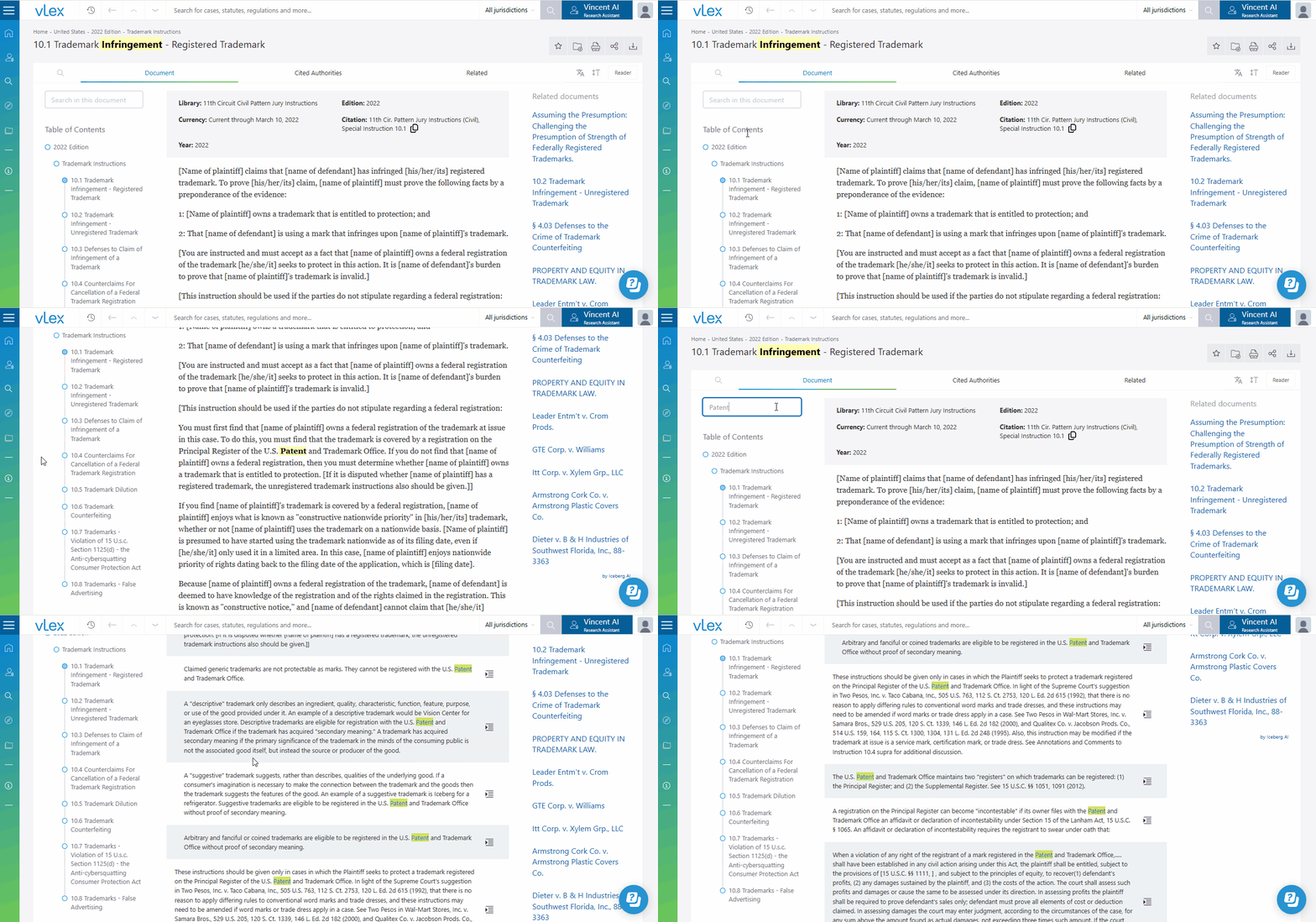
Para leyes, libros y otros documentos estructurados, el **Índice** es tu mejor herramienta de navegación. Se encuentra en el lado izquierdo del visor de documentos. Haz clic en cualquier título de sección o capítulo para saltar directamente a esa parte del texto.
{% tabs %}
{% tab title="Interfaz en Inglés" %}
El Índice te permite saltar a cualquier sección al instante.
{% endtab %}
{% tab title="Interfaz en Español" %}
El Índice te permite saltar a cualquier sección al instante.
{% endtab %}
{% endtabs %}
#### 2. Usa "Buscar en este documento"
Cuando necesites encontrar una palabra clave o frase específica dentro del documento que estás viendo:
1. Usa el **Buscar en este documento** campo en la parte superior izquierda del visor de documentos.
2. Aparecerá una lista de todas las instancias de tu término.
3. Haz clic en el **Ir al pasaje** icono junto a cualquier instancia para saltar directamente a esa ubicación en el texto.
#### 3. Sigue el "Mapa de Calor" en la Jurisprudencia
Al ver una sentencia, busca los resaltados azules en el texto. Estos indican pasajes que han sido citados por otros casos.
* Cuanto **más oscuro sea el tono de azul**, más frecuentemente se ha citado ese pasaje. Este "mapa de calor" te guía visualmente hacia las partes más influyentes e importantes de la sentencia.
{% hint style="success" %}
**Usa los Marcadores de la Barra de Desplazamiento:** La barra de desplazamiento en el lado derecho de una sentencia también muestra el mapa de calor. Puedes ver de un vistazo dónde se encuentran los pasajes más citados en el documento y hacer clic en los marcadores para saltar a ellos.
{% endhint %}
### Mejores prácticas y consejos profesionales
* **Pasa el cursor sobre los enlaces internos:** Antes de hacer clic en un enlace a otro documento, pasa el cursor sobre él para ver una tarjeta de vista previa. Esto te ayuda a decidir si el documento citado es relevante sin salir de tu página actual.
### Artículos relacionados
* [Flujo de trabajo: Cómo colaborar con tu equipo](/es-base-de-conocimiento-de-vlex-library/vlex-library/vlex-library-home/flujos-de-trabajo-y-herramientas-de-productividad/flujo-de-trabajo-como-colaborar-con-tu-equipo.md)
* [Guía para bibliotecarios jurídicos: Integrando vLex con los sistemas de tu biblioteca](/es-base-de-conocimiento-de-vlex-library/vlex-library/vlex-library-home/gestion-de-cuentas-y-administracion/guia-para-bibliotecarios-juridicos-integracion-de-vlex-con-los-sistemas-de-tu-biblioteca.md)
* [Flujo de trabajo: Cómo crear un plan de investigación en vLex Library](/es-base-de-conocimiento-de-vlex-library/vlex-library/vlex-library-home/flujos-de-trabajo-y-herramientas-de-productividad/flujo-de-trabajo-como-crear-un-plan-de-investigacion-en-vlex-library.md)
**¿Cuál es tu próximo paso?**
| **¿Nuevo en** vLex Library **?** | **¿Ya eres** vLex Library **cliente?** |
| ------------------------------------------------------------------------------------------------------------------------------------------------------------------------------------------------------------------------------------ | -------------------------------------------------------------------------------------------------------------------------------------------------------------------------------------- |
| [Descubre cómo vLex Library puede transformar tu práctica. **Solicitar una demostración personalizada**.](https://vlex.com/book-a-demo?utm_source=website\&utm_medium=organic\&utm_campaign=web_trial_homepage\&campaign_id=4270741) | [Si aún tienes preguntas o necesitas ayuda con una función específica, nuestro equipo está aquí para ayudarte. **Contacta a nuestro equipo de Soporte**.](https://vlex.com/contact-us) |