# Your First Analysis: Asking a Research Question

### Summary

Run your first analysis with Vincent. This beginner's guide shows you how to **Ask a research question** the most common workflow and get your first result from our **AI legal memo generator** in just a few simple steps.

### Why This is Important

The best way to understand the power of Vincent is to see it in action. Asking a Research Question is one of Vincent's most powerful workflows, and it's the perfect place to start. This guide will walk you through the simple process of turning a question into a comprehensive, fully-cited legal memo.

### Step-by-Step Guide

#### Step 1: Start the Workflow

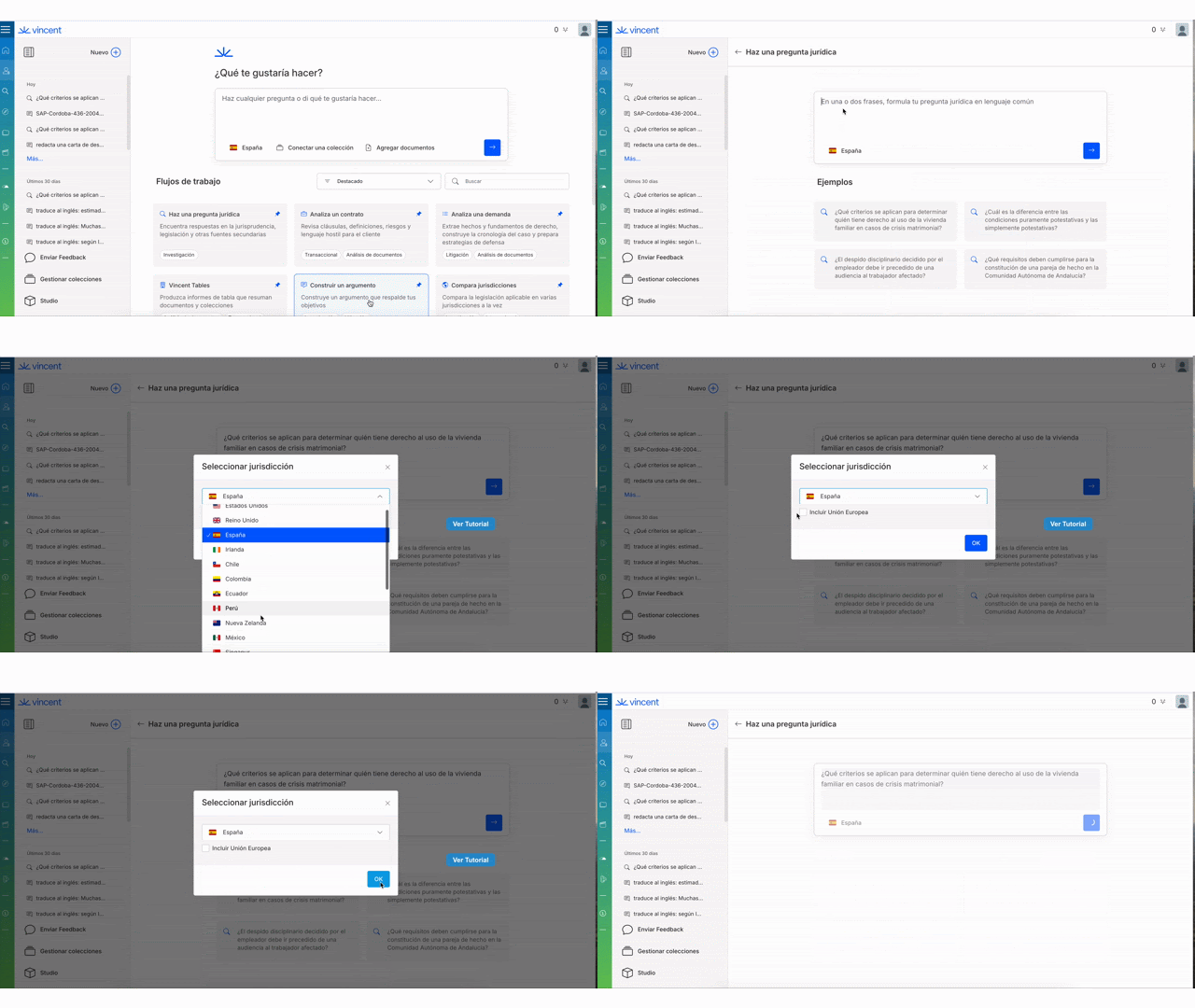
From the main Vincent landing page, select **Ask a Research Question** from the list of workflows.

{% tabs %}
{% tab title="English Interface " %}

<figure><img src="https://1556743161-files.gitbook.io/~/files/v0/b/gitbook-x-prod.appspot.com/o/spaces%2F-MS8Dq_iqEIflAmbaOkI-887967055%2Fuploads%2Fhp9F3PZadVV7MwmMcSKs%2Fimage%20(11).png?alt=media&#x26;token=b577454a-f4e1-4261-8864-a39f874209b6" alt=""><figcaption><p>Select the Ask a Research Question workflow in Vincent.</p></figcaption></figure>
{% endtab %}

{% tab title="Interfaz en Español" %}

<figure><img src="https://1556743161-files.gitbook.io/~/files/v0/b/gitbook-x-prod.appspot.com/o/spaces%2F-MS8Dq_iqEIflAmbaOkI-887967055%2Fuploads%2FIhQnygOSvbrGddrPPWDw%2FSelecciona%20el%20flujo%20de%20trabajo%20Hacer%20una%20pregunta%20de%20investigacio%CC%81n%20en%20Vincent..gif?alt=media&#x26;token=8484b916-89f1-4442-a188-d705a292ea78" alt=""><figcaption><p>Selecciona el flujo de trabajo Hacer una pregunta de investigación en Vincent.</p></figcaption></figure>
{% endtab %}
{% endtabs %}

#### Step 2: Ask Your Question and Select a Jurisdiction

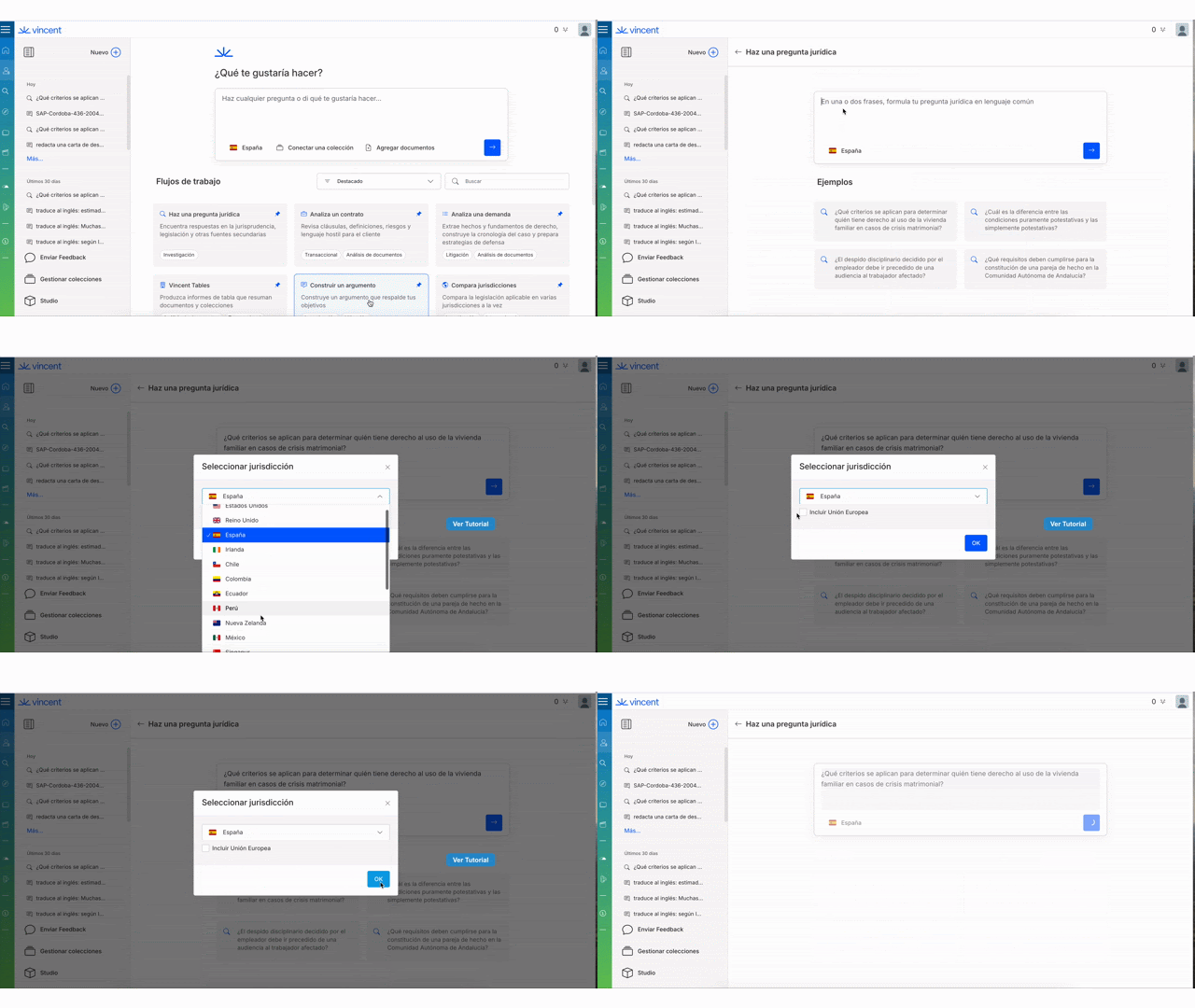
In the input screen, you will need to provide two key pieces of information:

1. **Your Legal Question:** Type your question directly into the box at the top of the page.
2. **Your Jurisdiction:** Use the **jurisdiction selector** below the question box to choose the specific jurisdiction(s) for your research.
3. When you are ready, press the **blue arrow** to start your query.

{% tabs %}
{% tab title="English Interface" %}

<figure><img src="https://1556743161-files.gitbook.io/~/files/v0/b/gitbook-x-prod.appspot.com/o/spaces%2F-MS8Dq_iqEIflAmbaOkI-887967055%2Fuploads%2FbtGyMiAZRW3cdR3gcAoC%2Fimage%20(1).gif?alt=media&#x26;token=56e0c6ca-1c0e-4d95-a64a-04ed7164b378" alt=""><figcaption><p>Enter your question and select the relevant jurisdiction.</p></figcaption></figure>
{% endtab %}

{% tab title="Interfaz en Español" %}

<figure><img src="https://1556743161-files.gitbook.io/~/files/v0/b/gitbook-x-prod.appspot.com/o/spaces%2F-MS8Dq_iqEIflAmbaOkI-887967055%2Fuploads%2FV1jzNiu2I7aIkGB6JzSv%2FUntitled%20video.gif?alt=media&#x26;token=3e27b14c-e332-4fed-9692-08c93e798e12" alt=""><figcaption><p>Introduce tu pregunta y selecciona la jurisdicción relevante.</p></figcaption></figure>
{% endtab %}
{% endtabs %}

#### Step 3: Review Your Results

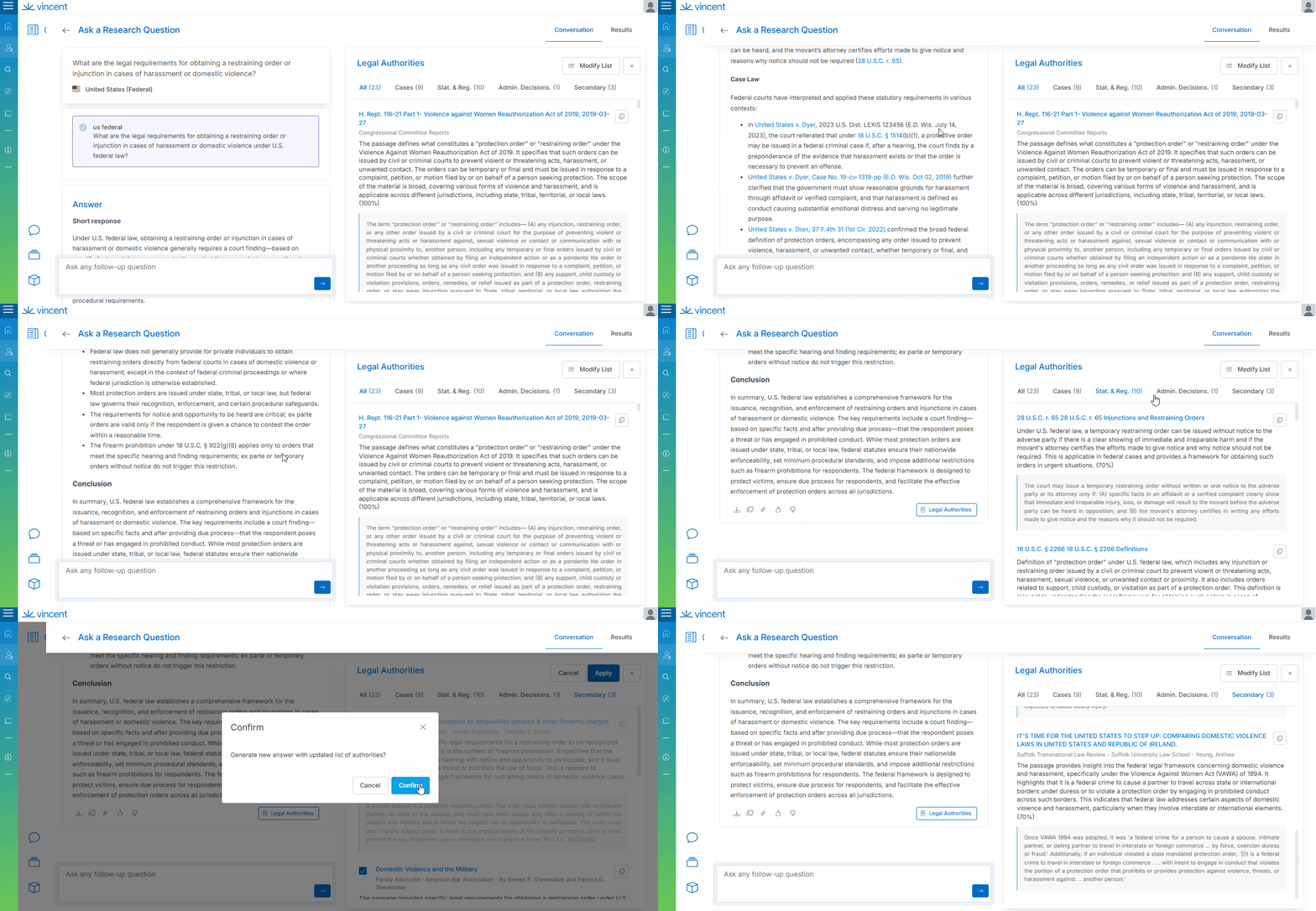
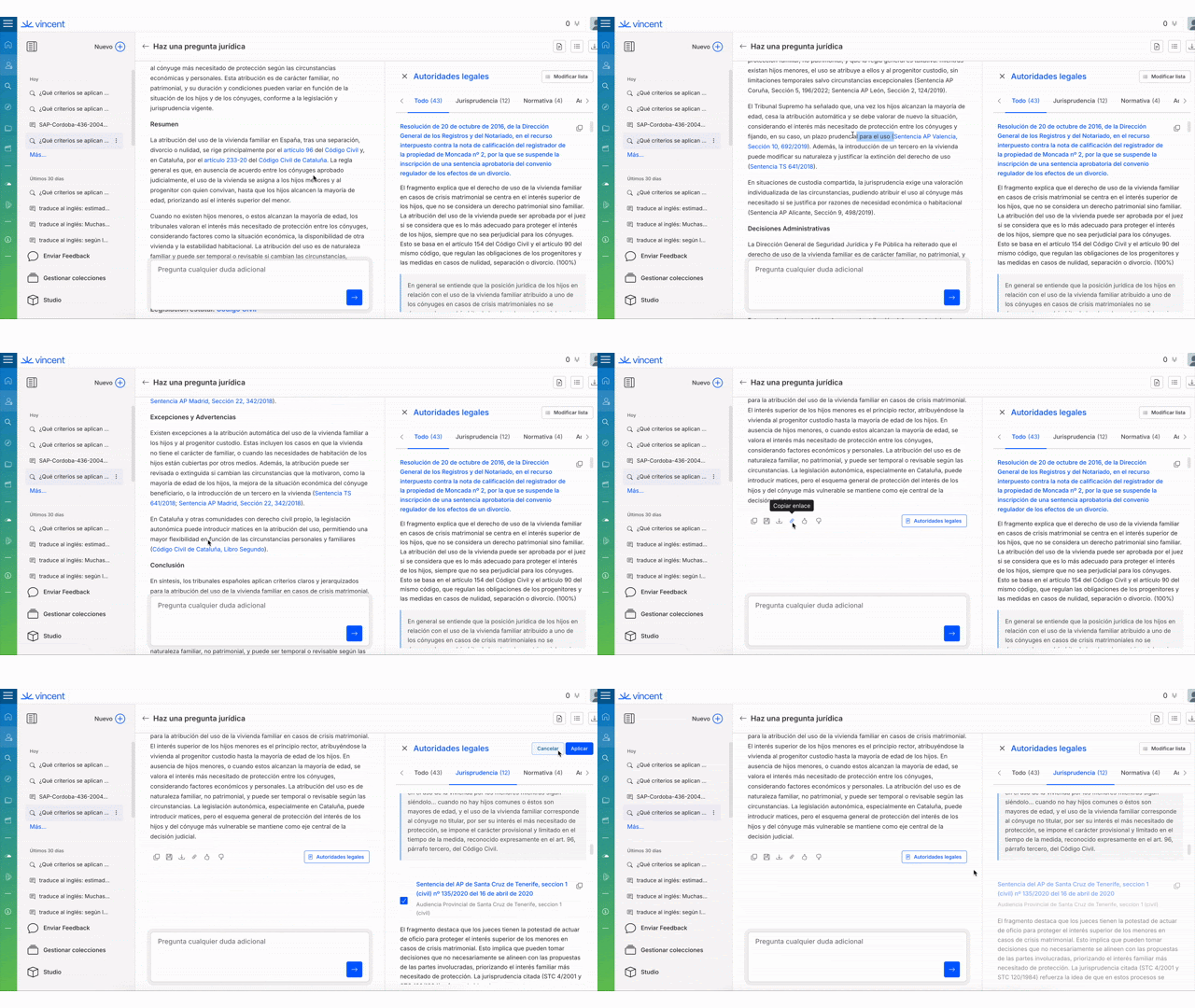
The answer may take a minute or two to generate. Once complete, your answer will be displayed on the left, with a full list of the authorities Vincent cited on the right. The generated memo is structured into three key parts:

* **Short Response:** A concise, one-paragraph answer to your question is placed right at the top.
* **Detailed Analysis:** Vincent then "shows its work" by providing a detailed breakdown of the sources it used.
* **Exceptions and Limitations:** Crucially, Vincent includes a section detailing any counterarguments or limitations.

{% tabs %}
{% tab title="English Interface " %}

<figure><img src="https://1556743161-files.gitbook.io/~/files/v0/b/gitbook-x-prod.appspot.com/o/spaces%2F-MS8Dq_iqEIflAmbaOkI-887967055%2Fuploads%2Fob24PViNn00UjFjboI5T%2FReview%20the%20generated%20memo%20and%20the%20supporting%20authorities.gif?alt=media&#x26;token=e6924dfe-390d-425a-989d-3b40c1e93cd9" alt=""><figcaption><p>Review the generated memo and the supporting authorities.</p></figcaption></figure>
{% endtab %}

{% tab title="Interfaz en Español " %}

<figure><img src="https://1556743161-files.gitbook.io/~/files/v0/b/gitbook-x-prod.appspot.com/o/spaces%2F-MS8Dq_iqEIflAmbaOkI-887967055%2Fuploads%2F55cvEl9burZmCGgQrTk0%2FRevisa%20el%20memorando%20generado%20y%20las%20autoridades%20de%20respaldo..gif?alt=media&#x26;token=f06c2e2b-7511-496a-b20b-b917bdee4ac4" alt=""><figcaption><p>Revisa el memorando generado y las autoridades de respaldo.</p></figcaption></figure>
{% endtab %}
{% endtabs %}

{% hint style="info" %}
**How Vincent Thinks: More Than Just a Keyword Search**&#x20;

When you ask a question, Vincent mimics an expert legal researcher. It understands the legal concepts behind your words and verifies the full citation history of a case to ensure the precedent is still good law, giving you a comprehensive and reliable result.
{% endhint %}

### Best Practices & Pro Tips

* **Be Specific:** The more specific your question, the more targeted your results will be. Include key facts and legal terms.
* **Trust but Verify:** Use the list of authorities on the right to click through and review the source documents for yourself.

### Relevant Video Content

{% tabs %}
{% tab title="English Version" %}
{% embed url="<https://vimeo.com/1036077122?share=copy>" %}

{% endtab %}

{% tab title="Versión en Español" %}
{% embed url="<https://vimeo.com/1023993557?share=copy>" %}

{% endtab %}

{% tab title="Caso de Uso: Colecciones (Video)" %}
{% embed url="<https://vimeo.com/1027580758?share=copy>" %}

{% endtab %}
{% endtabs %}

### Related Articles

* [Vincent for Litigation Attorneys](https://support.vlex.com/vincent-by-vlex/vincent/solutions-for-your-practice/vincent-for-litigation-attorneys)
* [Viewing Vincent coverage by jurisdiction](https://support.vlex.com/vincent-by-vlex/vincent/getting-started-with-vincent/viewing-vincent-coverage-by-jurisdiction)

**What's Your Next Step?**

| **New to Vincent?**                                                                                                                                                                                        | **Already a Vincent Customer?**                                                                                                                            |
| ---------------------------------------------------------------------------------------------------------------------------------------------------------------------------------------------------------- | ---------------------------------------------------------------------------------------------------------------------------------------------------------- |
| [See how Vincent can transform your practice. **Request a personalized demo**.](https://vlex.com/book-a-demo?utm_source=website\&utm_medium=organic\&utm_campaign=web_trial_homepage\&campaign_id=4270741) | [If you still have questions or need help with a specific feature, our team is here to assist. **Contact our Support team**.](https://vlex.com/contact-us) |


---

# Agent Instructions: Querying This Documentation

If you need additional information that is not directly available in this page, you can query the documentation dynamically by asking a question.

Perform an HTTP GET request on the current page URL with the `ask` query parameter:

```
GET https://support.vlex.com/vincent-by-vlex/vincent/getting-started-with-vincent/your-first-analysis-asking-a-research-question.md?ask=<question>
```

The question should be specific, self-contained, and written in natural language.
The response will contain a direct answer to the question and relevant excerpts and sources from the documentation.

Use this mechanism when the answer is not explicitly present in the current page, you need clarification or additional context, or you want to retrieve related documentation sections.