> For the complete documentation index, see [llms.txt](https://support.vlex.com/llms.txt). Markdown versions of documentation pages are available by appending `.md` to page URLs; this page is available as [Markdown](https://support.vlex.com/vincent-by-vlex/vincent/projects/create-a-project-and-set-it-up-in-vincent.md).

# Create a Project and Set It Up in Vincent

Learn how to create a Matter or General project in Vincent, set its name and visibility, edit its details, and use project status to keep your work organized.

#### Summary

Learn how to create a Matter or General project in Vincent, set its name and visibility, edit its details later, and use project status to keep your workspace organised.

### Why This is Important

A Project is where your team's work on a matter or a programme accumulates. Setting it up well at the start decides whether a colleague joining in month six can find it and understand it, so the name, the type, and the visibility are worth a moment's thought rather than a default.

### How to Create a Project

1. Open Projects. You will find it under the new conversation button in the main menu.
2. The Projects page opens, showing your existing Projects as tiles. Use the filters across the top, All, My Projects, Matters, General, Active, On hold, Closed, or the search and sort controls to narrow the list.
3. Click New Project.
4. Choose the type:
5. Matter: for a case or a deal, with matter details.
6. General: for work that is not a matter, with free-text project instructions instead of matter fields.
7. Enter a Name (shown as Matter name for a Matter project). A description is optional.
8. Set the visibility: available to your whole organization, or to invited members only.
9. Click Create.

<figure><img src="https://1556743161-files.gitbook.io/~/files/v0/b/gitbook-x-prod.appspot.com/o/spaces%2F-MS8Dq_iqEIflAmbaOkI-887967055%2Fuploads%2FBC0jB68Pgrhc7acvhXBX%2FTo%20create%20a%20project%2C%20open%20Projects%20from%20the%20main%20menu%2C%20select%20New%20Project%2C%20choose%20a%20Matter%20or%20General%20type%2C%20enter%20your%20project%20details%20and%20visibility%2C%20and%20click%20Create..gif?alt=media&amp;token=b11bbb95-3775-4545-b5c3-82dde3ea88c4" alt=""><figcaption><p>To create a project, open Projects from the main menu, select New Project, choose a Matter or General type, enter your project details and visibility, and click Create.</p></figcaption></figure>

Each tile shows how many people have access, how many files it holds, its type, and its status. Hovering over a tile shows when it was created and by whom.

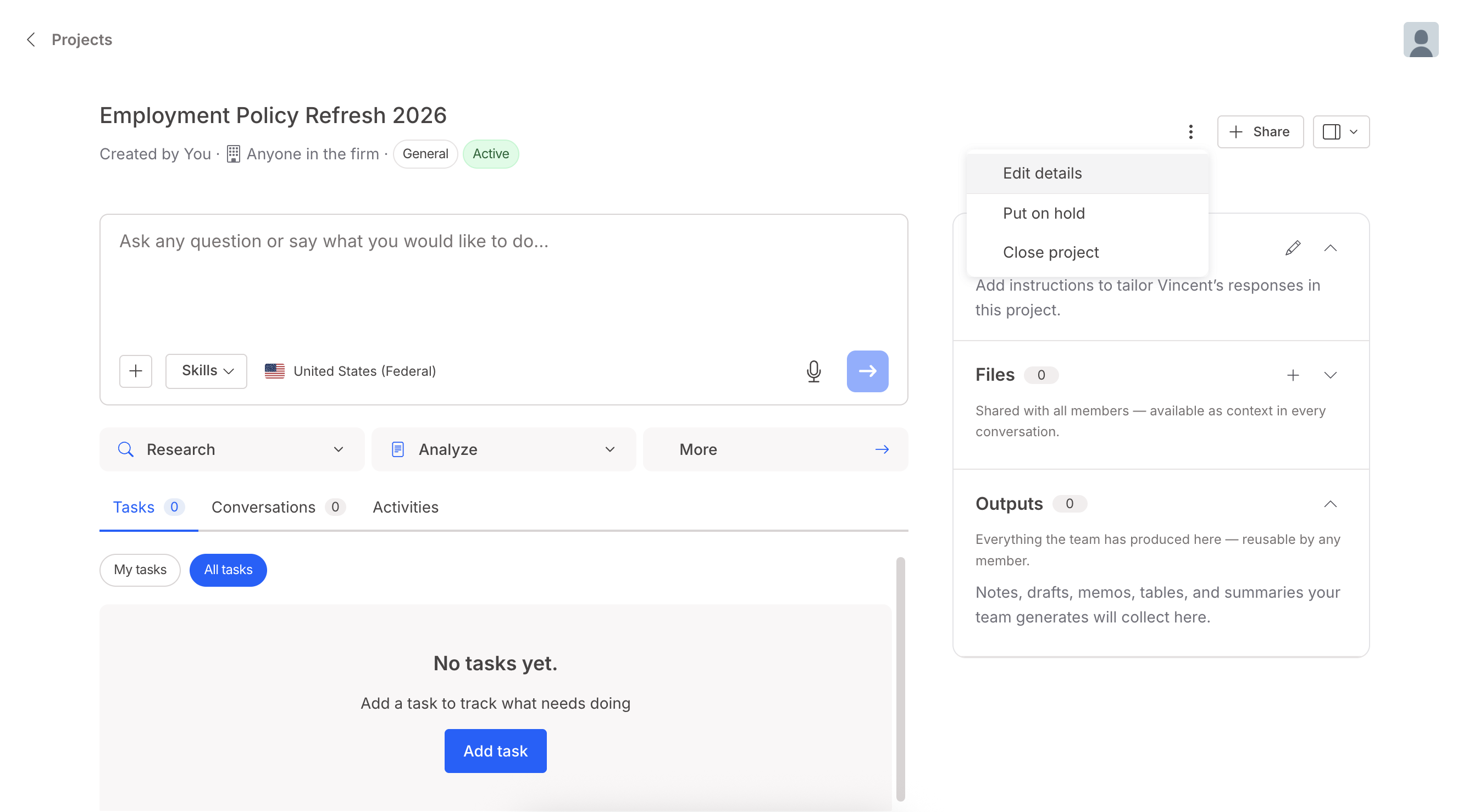
### How to Edit a Project's Details

<figure><img src="https://1556743161-files.gitbook.io/~/files/v0/b/gitbook-x-prod.appspot.com/o/spaces%2F-MS8Dq_iqEIflAmbaOkI-887967055%2Fuploads%2FTNKFgsV4HnrdjAzYuNSR%2FScreenshot%202026-09-30%20at%2011.23.04%E2%80%AFAM.png?alt=media&amp;token=b2e43794-48e0-4783-a9e5-6e1f1db3f225" alt=""><figcaption><p>Matter and project details can be changed after creation. Open the Project and edit the details from.</p></figcaption></figure>

### How to Use Project Status

A Project can be Active, On hold, or Closed.

1. Open the Project and change the status from.
2. Enter a reason for the change. The date is recorded automatically.

<figure><img src="https://1556743161-files.gitbook.io/~/files/v0/b/gitbook-x-prod.appspot.com/o/spaces%2F-MS8Dq_iqEIflAmbaOkI-887967055%2Fuploads%2FfenHxsQUZmo7SjjNl66Z%2FManage%20your%20project%20lifecycle%20by%20changing%20its%20status%20to%20Active%2C%20On%20hold%2C%20or%20Closed%20with%20an%20automatic%20date%20record.%20Closing%20a%20project%20makes%20it%20read-only%2C%20disabling%20Vincent%20AI%20runs%20and%20file%20edits%20until%20reopened..gif?alt=media&amp;token=3f7c4822-3a8f-4e45-a6c2-c320b53d41c4" alt=""><figcaption><p>Manage your project lifecycle by changing its status to Active, On hold, or Closed with an automatic date record. Closing a project makes it read-only, disabling Vincent AI runs and file edits until reopened.</p></figcaption></figure>

Status is an organising tool and an audit record. It does not otherwise change how a Project behaves, with one exception: a Closed Project becomes read-only. Vincent cannot be run inside it, files cannot be added, and the matter summary cannot be edited. A closed Project can be reopened later.

### How to Customise Your View of a Project

Individual panels, outputs, the matter summary, and so on, can be hidden or shown. This setting is personal to you and does not change what other members see.

<figure><img src="https://1556743161-files.gitbook.io/~/files/v0/b/gitbook-x-prod.appspot.com/o/spaces%2F-MS8Dq_iqEIflAmbaOkI-887967055%2Fuploads%2F65yoxsfu3HF2yxsecPrD%2FCustomise%20your%20project%20interface%20by%20showing%20or%20hiding%20individual%20panels%2C%20outputs%2C%20and%20matter%20summaries.%20Layout%20preferences%20are%20personal%20to%20your%20account%20and%20will%20not%20affect%20what%20other%20members%20see..gif?alt=media&amp;token=b4b930b3-3ffb-4558-a66c-9fe6780f886a" alt=""><figcaption><p>Customize your project interface by showing or hiding individual panels, outputs, and matter summaries. Layout preferences are personal to your account and will not affect what other members see.</p></figcaption></figure>

### Best Practices & Pro Tips

Name Projects the way your firm names matters. Use your matter numbering or a client–matter–period convention. Free-form names drift quickly across a team, and a Project only earns its value if the colleague who inherits it can find it.

Close a Project rather than leaving it Active, and say why. The reason you enter is recorded with the date. When someone asks six months later why work on a file stopped, that entry is the answer, and it sits with the work rather than in somebody's inbox.

#### Related Articles

* [Creating a Custom Skill](/vincent-by-vlex/vincent/skills/creating-a-custom-skill.md)
* [Editing and Managing Your Skills](/vincent-by-vlex/vincent/skills/editing-and-managing-your-skills.md)
* [Submitting a Skill for Organization-Wide Use](/vincent-by-vlex/vincent/skills/submitting-a-skill-for-organization-wide-use.md)
* [What are Skills in Vincent?](/vincent-by-vlex/vincent/skills/what-are-skills-in-vincent.md)

**What's Your Next Step?**

| **New to Vincent?**                                                                                                                                                                                        | **Already a Vincent Customer?**                                                                                                                            |
| ---------------------------------------------------------------------------------------------------------------------------------------------------------------------------------------------------------- | ---------------------------------------------------------------------------------------------------------------------------------------------------------- |
| [See how Vincent can transform your practice. **Request a personalized demo**.](https://vlex.com/book-a-demo?utm_source=website\&utm_medium=organic\&utm_campaign=web_trial_homepage\&campaign_id=4270741) | [If you still have questions or need help with a specific feature, our team is here to assist. **Contact our Support team**.](https://vlex.com/contact-us) |