> For the complete documentation index, see [llms.txt](https://support.vlex.com/llms.txt). Markdown versions of documentation pages are available by appending `.md` to page URLs; this page is available as [Markdown](https://support.vlex.com/vincent-by-vlex/vincent/support-and-account-administration/providing-feedback-and-suggestions.md).
# Providing Feedback & Suggestions
Learn how to provide Vincent feedback. This guide shows you how to submit a vLex feature request or report a bug directly to our product team using the feedback form.
### Summary
Learn how to provide **Vincent feedback**. This guide shows you the official process to submit a **vLex feature request** or **report a bug** directly to our product team using the built-in feedback form, ensuring your voice is heard.
### Why This is Important
Your feedback is essential to helping us make Vincent the best possible legal AI assistant. Whether you have a great idea for a new feature or have encountered an issue, providing feedback through the official channel is the most effective way to ensure it reaches the right team at vLex.
### Step-by-Step Guide
#### Step 1: Access the Feedback Form
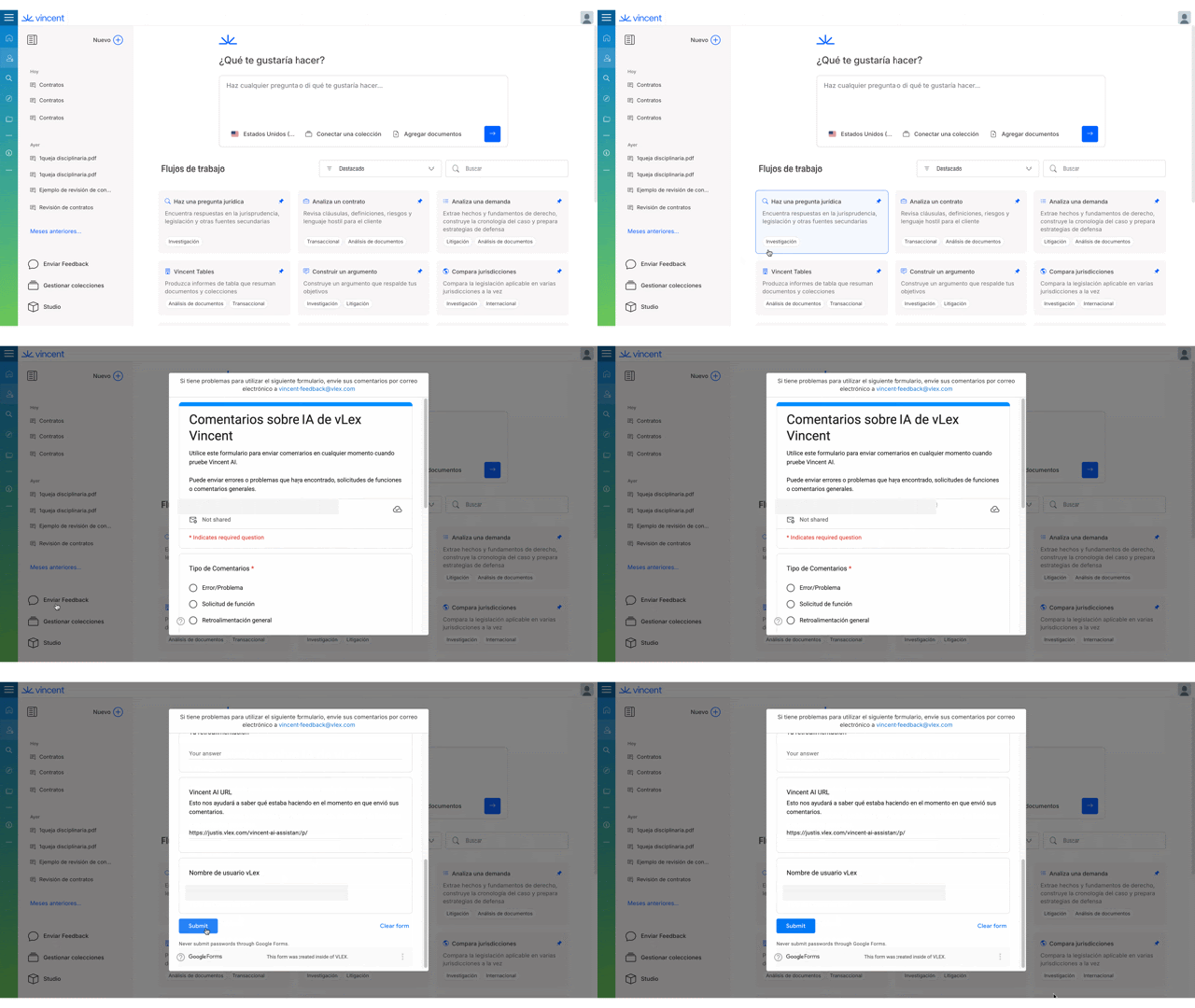
From the main Vincent interface, navigate to the bottom of the left-hand menu and click on **'Submit Feedback'**.
{% tabs %}
{% tab title="English Interface" %}

{% endtab %}
{% tab title="Interfaz en Español" %}
Haz clic en 'Enviar comentarios' para abrir el formulario.
{% endtab %}
{% endtabs %}
#### Step 2: Select Your Feedback Type
In the feedback form, the first step is to categorize your input. Choose one of the following from the **'Feedback Type'** dropdown menu:
* **Bug / Issue:** Use this if something is broken or not working as expected.
* **Feature Request:** Use this if you have an idea for a new feature or an improvement to an existing one.
* **General Feedback:** Use this for any other comments or suggestions.
#### Step 3: Provide Detailed Feedback
In the **'Your Feedback'** box, please provide as much detail as possible.
* If you are reporting a bug, describe the steps you took to produce the error.
* If you are requesting a feature, explain the problem you are trying to solve.
#### Step 4: Submit Your Feedback
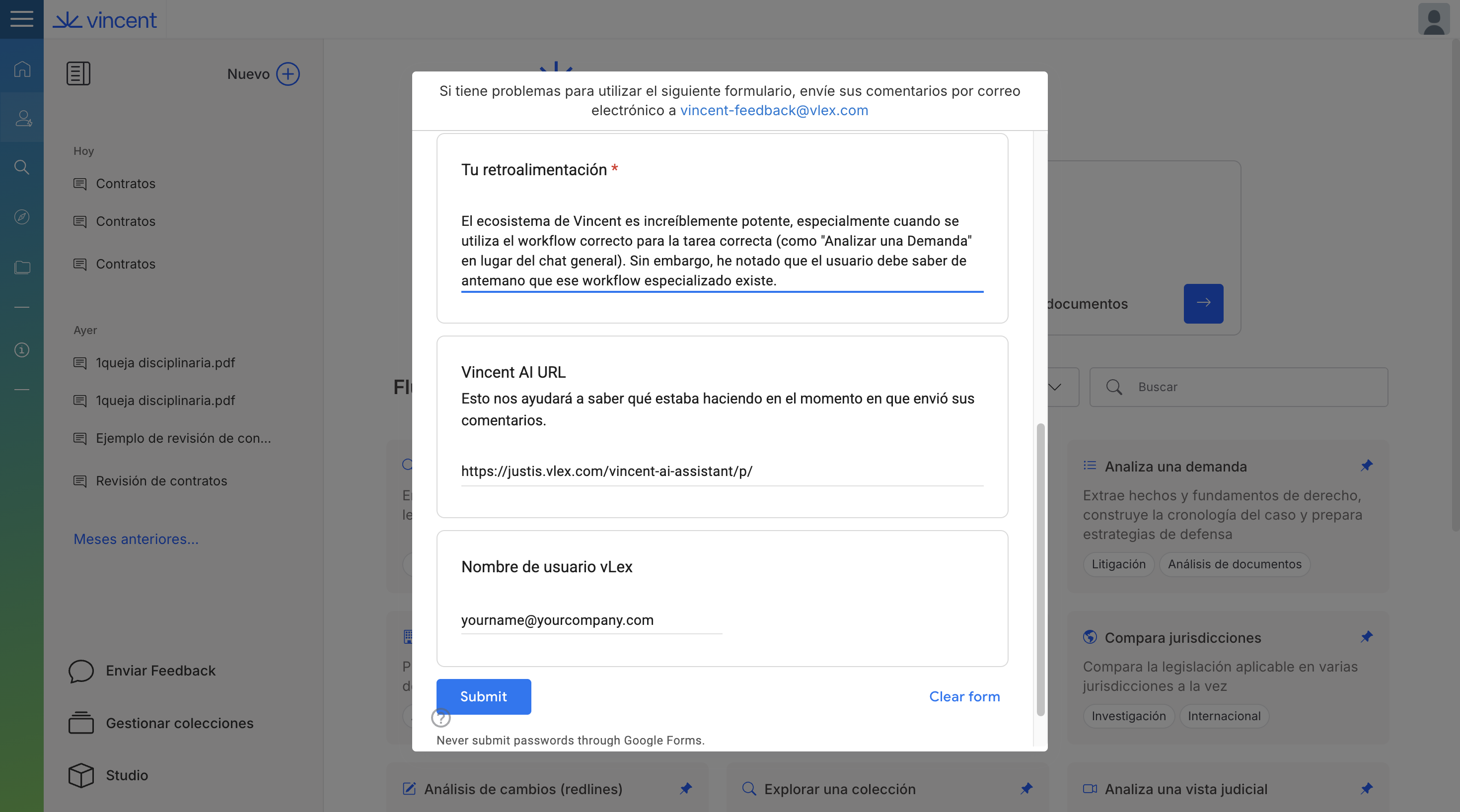
The form will automatically include your **Username** and the **Vincent URL** you were on, which helps our team understand the context. When you are ready, click **'Submit'**.
{% tabs %}
{% tab title="English Interface" %}

{% endtab %}
{% tab title="Interfaz en Español" %}
Rellena los detalles y haz clic en 'Enviar' para enviar tus comentarios a nuestro equipo.
{% endtab %}
{% endtabs %}
{% hint style="info" %}
If you are having trouble using the feedback form, you can also email your feedback directly to .
{% endhint %}
### Best Practices & Pro Tips
* **Be Specific:** The more detail you provide in your feedback, the easier it is for our team to understand and act on it.
* **One Idea Per Submission:** If you have multiple feature requests or bug reports, it's best to submit them one at a time.
### Related Articles
* [Troubleshooting & FAQ](/vincent-by-vlex/vincent/support-and-account-administration/troubleshooting-and-faq.md)
* [Accessing Vincent and Navigating the Interface](/vincent-by-vlex/vincent/getting-started-with-vincent/accessing-vincent-and-navigating-the-interface.md)
**What's Your Next Step?**
| **New to Vincent?** | **Already a Vincent Customer?** |
| ---------------------------------------------------------------------------------------------------------------------------------------------------------------------------------------------------------- | ---------------------------------------------------------------------------------------------------------------------------------------------------------- |
| [See how Vincent can transform your practice. **Request a personalized demo**.](https://vlex.com/book-a-demo?utm_source=website\&utm_medium=organic\&utm_campaign=web_trial_homepage\&campaign_id=4270741) | [If you still have questions or need help with a specific feature, our team is here to assist. **Contact our Support team**.](https://vlex.com/contact-us) |