# Accessing and Managing Your Search History

### Summary

Review your past activity in vLex Library by accessing your **History**. This feature allows you to quickly find previously viewed documents and re-run past searches, ensuring you never lose track of important research.

### Why This is Important

Your search history is a critical time-saving tool. It allows you to instantly return to a key document without having to reconstruct a complex search query, ensuring a seamless and efficient **legal research workflow**.

### How to Use Your History

#### Viewing Your Recent History

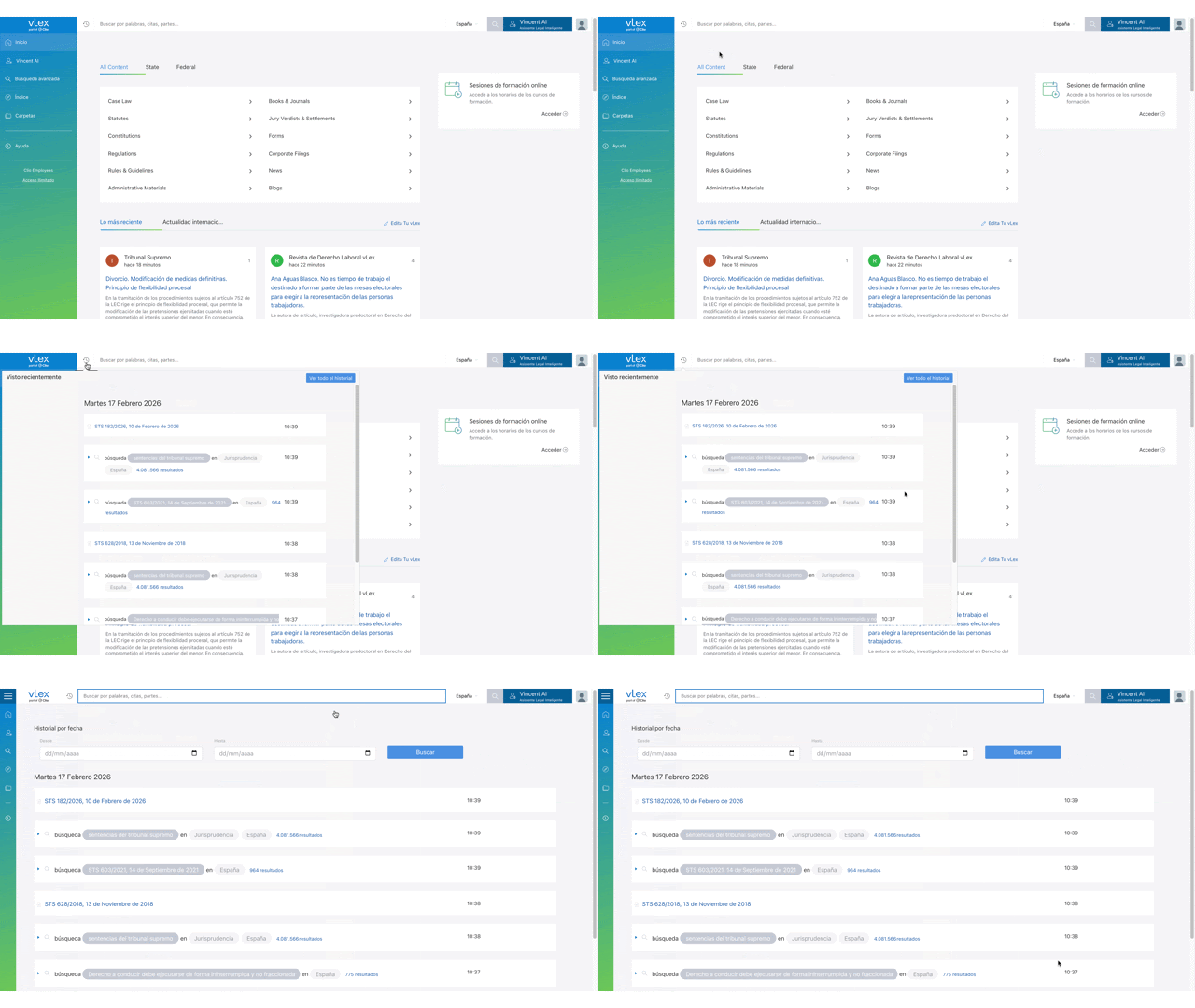
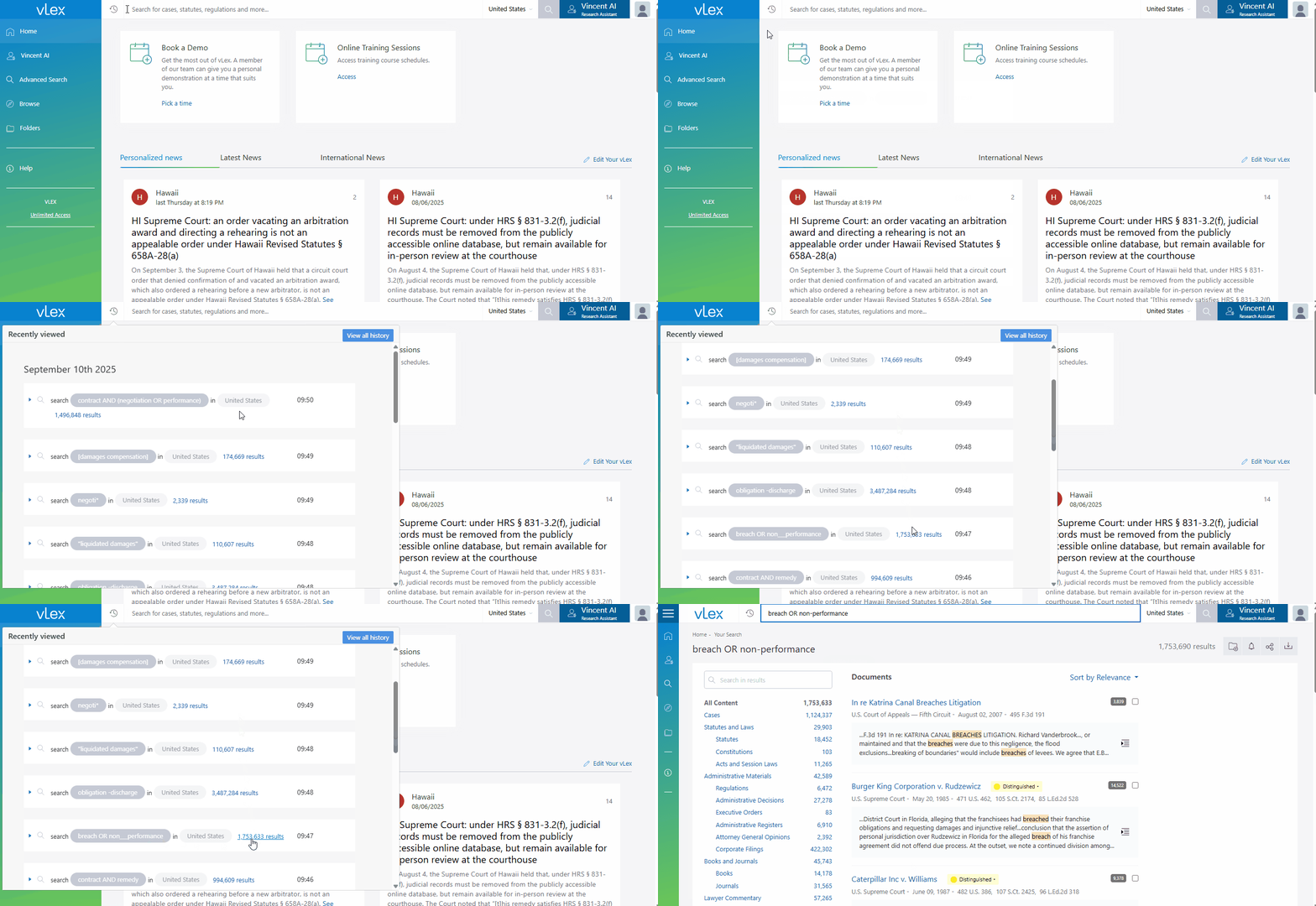
1. Click the **History** (clock) icon located to the right of the Smart Searchbar at the top of the page.
2. A dropdown menu will appear showing your most recently viewed documents and executed searches.
3. Click on any item to navigate directly to it.

{% tabs %}
{% tab title="English Interface" %}

<figure><img src="https://1556743161-files.gitbook.io/~/files/v0/b/gitbook-x-prod.appspot.com/o/spaces%2F-MS8Dq_iqEIflAmbaOkI-887967055%2Fuploads%2FprfPdU4KwcLTEjbI48xd%2FAccess%20your%20most%20recent%20activity%20directly%20from%20the%20History%20icon..gif?alt=media&#x26;token=b294c9d5-276c-4a8f-bf31-fec5a5ee8e17" alt=""><figcaption><p>Access your most recent activity directly from the History icon.</p></figcaption></figure>
{% endtab %}

{% tab title="Interfaz en Español" %}

<figure><img src="https://1556743161-files.gitbook.io/~/files/v0/b/gitbook-x-prod.appspot.com/o/spaces%2F-MS8Dq_iqEIflAmbaOkI-887967055%2Fuploads%2FKbCicoEUp6y8G7lrCGtn%2FAcceda%20a%20su%20actividad%20ma%CC%81s%20reciente%20directamente%20desde%20el%20i%CC%81cono%20de%20Historial..gif?alt=media&#x26;token=947821e6-d9e4-4454-a171-d5e38f002b7f" alt=""><figcaption><p>Acceda a su actividad más reciente directamente desde el ícono de Historial.</p></figcaption></figure>
{% endtab %}
{% endtabs %}

#### Viewing Your Full History

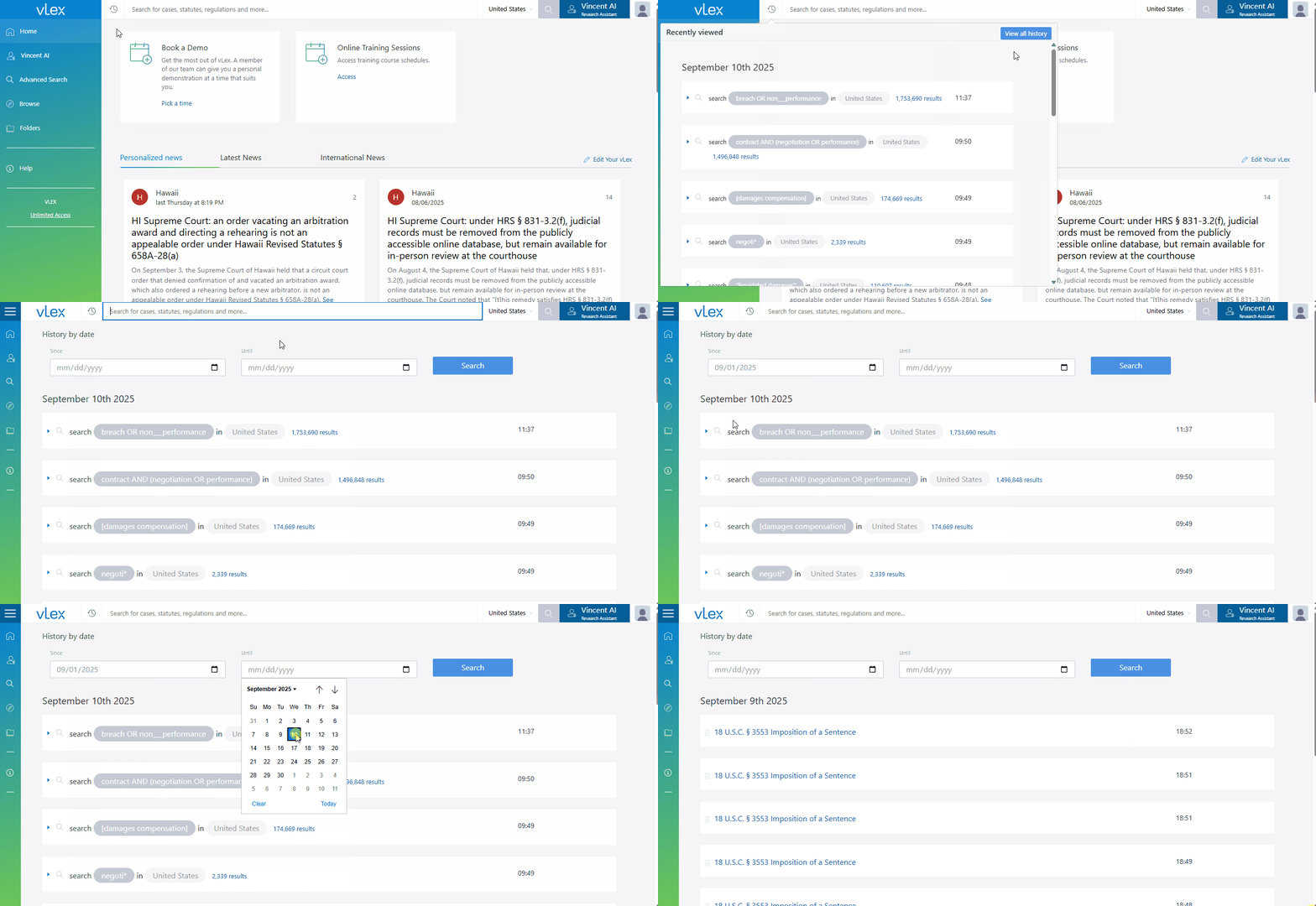
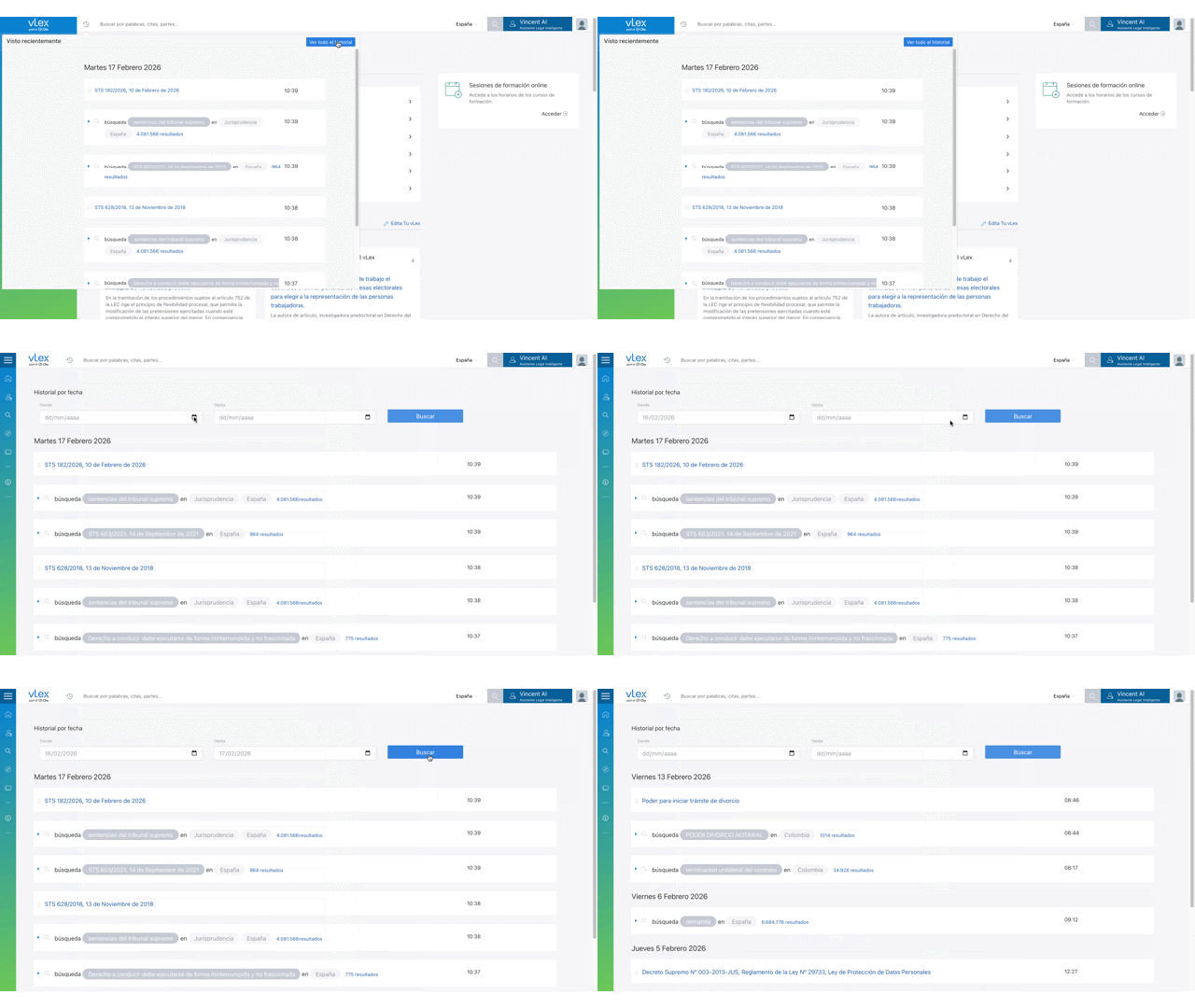
For a complete record of your activity, click **View all history** at the bottom of the dropdown menu. This will take you to a dedicated page with your complete, dated history.

{% tabs %}
{% tab title="English Interface" %}

<figure><img src="https://1556743161-files.gitbook.io/~/files/v0/b/gitbook-x-prod.appspot.com/o/spaces%2F-MS8Dq_iqEIflAmbaOkI-887967055%2Fuploads%2FZgQVlHBsHe2LpnHqxmCQ%2FClick%20View%20all%20history%20for%20a%20complete%20record%20of%20your%20past%20activity.gif?alt=media&#x26;token=0a4abcb4-40dc-4959-b029-ffcd46d45a18" alt=""><figcaption><p>Click View all history for a complete record of your past activity.</p></figcaption></figure>
{% endtab %}

{% tab title="Interfaz en Español" %}

<figure><img src="https://1556743161-files.gitbook.io/~/files/v0/b/gitbook-x-prod.appspot.com/o/spaces%2F-MS8Dq_iqEIflAmbaOkI-887967055%2Fuploads%2FidmtQFEiAB3KJuryVMeq%2FHaga%20clic%20en%20Ver%20todo%20el%20historial%20para%20obtener%20un%20registro%20completo%20de%20su%20actividad%20pasada..gif?alt=media&#x26;token=702d8bc9-04ef-4ba7-ae00-e85446b0cb85" alt=""><figcaption><p>Haga clic en Ver todo el historial para obtener un registro completo de su actividad pasada.</p></figcaption></figure>
{% endtab %}
{% endtabs %}

#### Pausing History Tracking

If you need to conduct research without recording it to your history for a specific session:

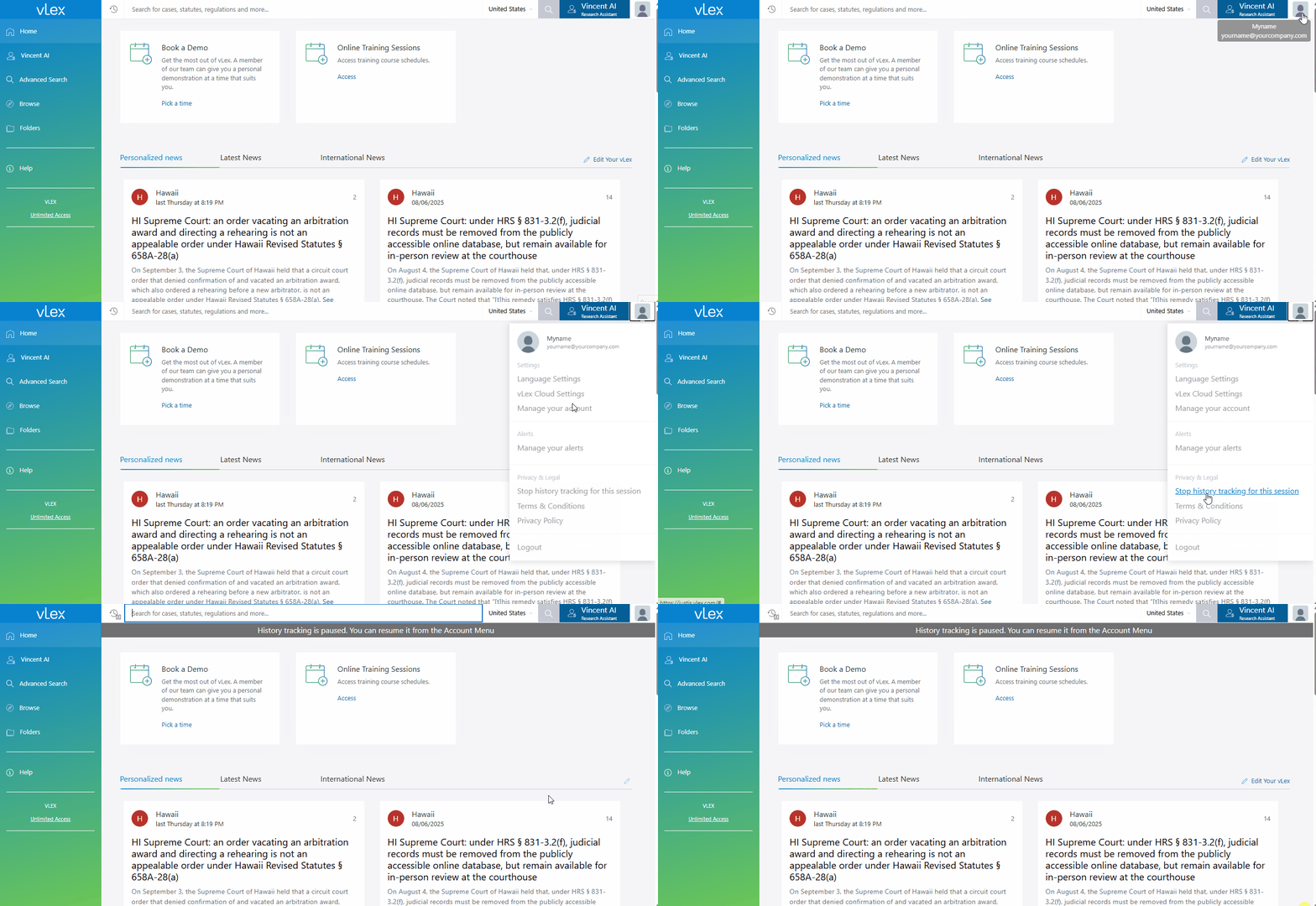
1. Click the **person icon** in the top-right corner of the screen.
2. Select **Stop history tracking for this session** from the menu.
3. You can re-enable it at any time by selecting **Resume history tracking** from the same menu.

{% tabs %}
{% tab title="English Interface" %}

<figure><img src="https://1556743161-files.gitbook.io/~/files/v0/b/gitbook-x-prod.appspot.com/o/spaces%2F-MS8Dq_iqEIflAmbaOkI-887967055%2Fuploads%2FJ3wnNmQnb25ByiDLRJCS%2FPause%20history%20tracking%20for%20a%20session%20directly%20from%20your%20profile%20menu.gif?alt=media&#x26;token=fe13799d-c2aa-427e-842c-7e4368c91689" alt=""><figcaption><p>Pause history tracking for a session directly from your profile menu.</p></figcaption></figure>
{% endtab %}

{% tab title="Interfaz en Español" %}

<figure><img src="https://1556743161-files.gitbook.io/~/files/v0/b/gitbook-x-prod.appspot.com/o/spaces%2F-MS8Dq_iqEIflAmbaOkI-887967055%2Fuploads%2FssxGVE9kbx7AYxXLx4pk%2FPausa%20el%20seguimiento%20del%20historial%20para%20una%20sesio%CC%81n%20directamente%20desde%20el%20menu%CC%81%20de%20su%20perfil..gif?alt=media&#x26;token=cf001d52-e8d4-4afa-8de3-7fb608d2babd" alt=""><figcaption><p>Pausa el seguimiento del historial para una sesión directamente desde el menú de su perfil.</p></figcaption></figure>
{% endtab %}
{% endtabs %}

{% hint style="warning" %}
**Personal Account Required**: The History feature is only available for personal accounts. If you are accessing vLex Library through a generic institutional account (e.g., a university-wide IP login), your history will not be saved.
{% endhint %}

### Best Practices & Pro Tips

* **Re-run, Don't Re-type:** Instead of typing a complex search again, find it in your history and click it to get the most up-to-date results for that query.

### Related Articles

* [Personalizing Your vLex Library Experience](https://support.vlex.com/vlex-library/vlex-library-home/getting-started/personalizing-your-vlex-library-experience)
* [How to Start Your Research in vLex Library](https://support.vlex.com/vlex-library/vlex-library-home/getting-started/how-to-start-your-research-in-vlex-library)
* [How to Sign In to vLex Library](https://support.vlex.com/vlex-library/vlex-library-home/getting-started/how-to-sign-in-to-vlex-library)

**What's Your Next Step?**

| **New to** vLex Library **?**                                                                                                                                                                                   | **Already a** vLex Library **Customer?**                                                                                                                   |
| --------------------------------------------------------------------------------------------------------------------------------------------------------------------------------------------------------------- | ---------------------------------------------------------------------------------------------------------------------------------------------------------- |
| [See how vLex Library can transform your practice. **Request a personalized demo**.](https://vlex.com/book-a-demo?utm_source=website\&utm_medium=organic\&utm_campaign=web_trial_homepage\&campaign_id=4270741) | [If you still have questions or need help with a specific feature, our team is here to assist. **Contact our Support team**.](https://vlex.com/contact-us) |