# Personalizing Your vLex Library Experience

### Summary

Customize vLex Library to fit your unique legal research needs by creating alerts for new documents, following key topics for updates, and adjusting your jurisdiction and language settings. This guide covers the essential first steps after creating your account.

### Why This is Important

Personalizing your account transforms vLex Library from a general database into a powerful, proactive research assistant. It saves you time by pushing relevant updates directly to you and ensures the results you see are always tailored to your specific areas of practice.

### How to Personalize Your Account

Follow these steps to customize your vLex Library experience.

#### 1. Create Alerts to Monitor New Documents

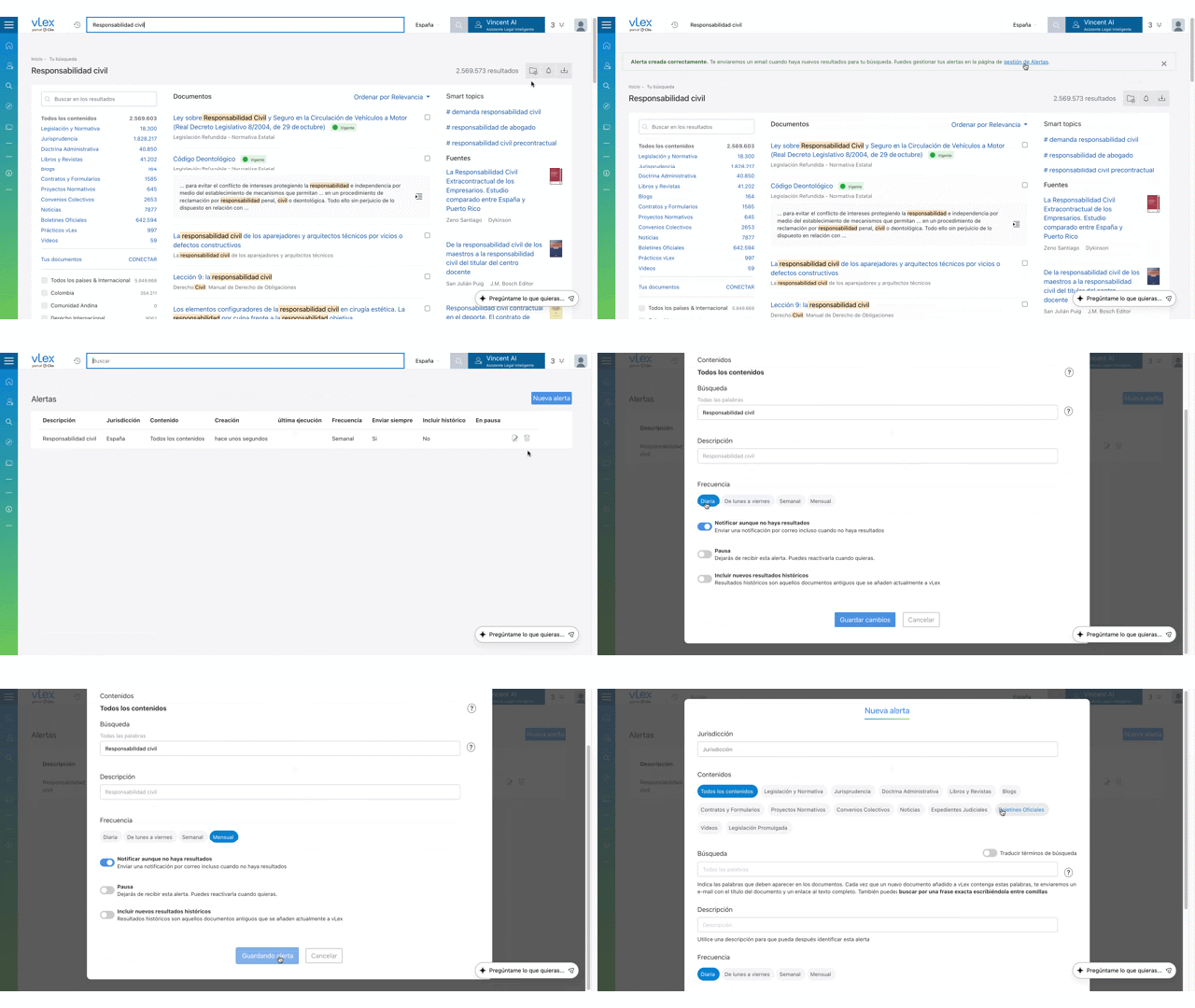
**Alerts** notify you via email when *new documents* matching your specific search criteria are added to vLex Library.

1. Run a search for a topic, case type, or keyword phrase you want to monitor.
2. On the results page, click the **Create alert** (bell) icon located at the top of the results list.
3. Give your alert a name and confirm. You can also create alerts directly from the **Advanced search** page.

{% tabs %}
{% tab title="English Interface" %}

<figure><img src="https://1556743161-files.gitbook.io/~/files/v0/b/gitbook-x-prod.appspot.com/o/spaces%2F-MS8Dq_iqEIflAmbaOkI-887967055%2Fuploads%2FjZbFUQYOsTTjYDiMVSQ3%2FCreate%20an%20alert%20directly%20from%20any%20search%20results%20page.gif?alt=media&#x26;token=c8270e2a-0a7b-43de-915f-8e30855fb0b1" alt=""><figcaption><p>Create an alert directly from any search results page.</p></figcaption></figure>
{% endtab %}

{% tab title="Interfaz en Español" %}

<figure><img src="https://1556743161-files.gitbook.io/~/files/v0/b/gitbook-x-prod.appspot.com/o/spaces%2F-MS8Dq_iqEIflAmbaOkI-887967055%2Fuploads%2FTTHgUQ5d1C3m3YVzioBV%2FCree%20una%20alerta%20directamente%20desde%20cualquier%20pa%CC%81gina%20de%20resultados%20de%20bu%CC%81squeda..gif?alt=media&#x26;token=57aeaf29-8c7d-46af-b541-28f8fd5fabad" alt=""><figcaption><p>Cree una alerta directamente desde cualquier página de resultados de búsqueda.</p></figcaption></figure>
{% endtab %}
{% endtabs %}

#### 2. Follow Documents and SmartTopics for Updates

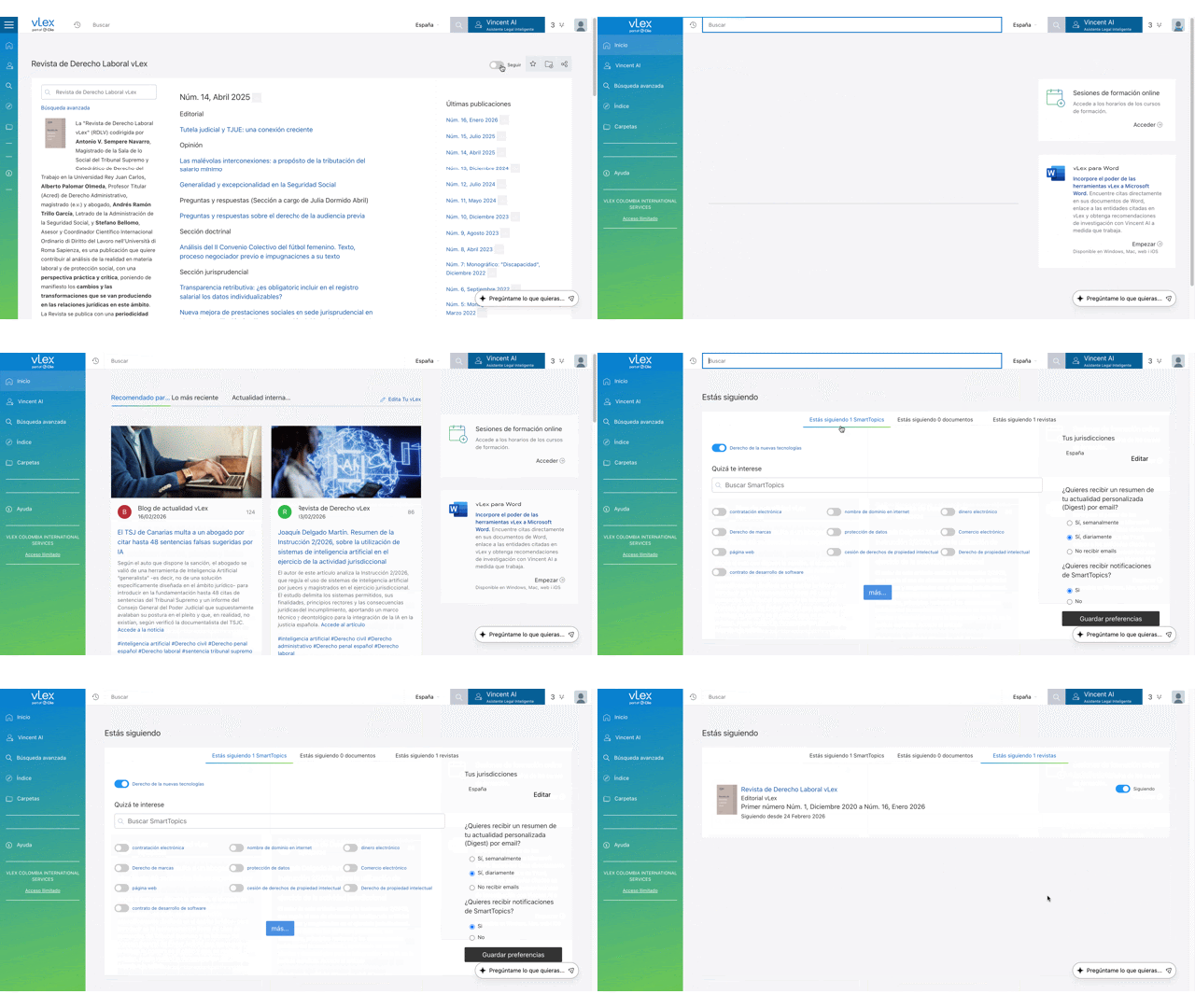
**Following** notifies you about *updates to existing documents* or topics, such as amendments to legislation or new journal issues. These updates appear in your **Personalised news** tab on the Homepage.

* **To Follow a Document:** Open any document, journal, or docket and click the **Follow** toggle at the top of the page.
* **To Follow a SmartTopic:** On a SmartTopics results page, use the same **Follow** toggle.

{% tabs %}
{% tab title="English Interface" %}

<figure><img src="https://1556743161-files.gitbook.io/~/files/v0/b/gitbook-x-prod.appspot.com/o/spaces%2F-MS8Dq_iqEIflAmbaOkI-887967055%2Fuploads%2FXxK86AHqA1qugFbTVtth%2FUse%20the%20Follow%20toggle%20to%20receive%20notifications%20about%20specific%20documents%20or%20topics.gif?alt=media&#x26;token=1d19d159-88d0-4a1c-8b86-ced6c0b04417" alt=""><figcaption><p>Use the Follow toggle to receive notifications about specific documents or topics.</p></figcaption></figure>
{% endtab %}

{% tab title="Interfaz en Español" %}

<figure><img src="https://1556743161-files.gitbook.io/~/files/v0/b/gitbook-x-prod.appspot.com/o/spaces%2F-MS8Dq_iqEIflAmbaOkI-887967055%2Fuploads%2FQjIGzC0iGL0165cm5GXT%2FUse%20el%20interruptor%20de%20Seguir%20para%20recibir%20notificaciones%20sobre%20documentos%20o%20temas%20especi%CC%81ficos..gif?alt=media&#x26;token=cddd9d34-09f5-4006-98a6-fc488726ba22" alt=""><figcaption><p>Use el interruptor de Seguir para recibir notificaciones sobre documentos o temas específicos.</p></figcaption></figure>
{% endtab %}
{% endtabs %}

#### 3. Customize Your Jurisdiction and Language Settings

Tailor your default search environment to match your primary location and language needs.

1. Click the **person icon** in the top-right corner and select **Manage your account**.
2. **Set Your Country:** This customizes your Newsfeed and sets the default jurisdiction for all new searches.
3. **Set Language Preferences:** In **Language settings**, you can set the interface language and manage automatic translation preferences to streamline your multi-jurisdictional legal research.

#### 4. Manage All Your Preferences

You can review and manage all your personalized settings from a central location.

* On the **Homepage**, use the **Edit your vLex** menu to see and manage all the documents and SmartTopics you follow.
* From the **person icon** menu, select **Alerts** to view, edit, or delete any of the search alerts you have created.

### Best Practices & Pro Tips

* **Alerts vs. Following:** Remember, use **Alerts** for *new* documents matching a search. Use **Follow** for *updates* to an *existing* document or topic.
* **Rate Documents:** Use the **Rate this document** button at the bottom of documents. This helps vLex learn your preferences and provide better suggestions over time.
* **Integrate Your Own Work:** For the ultimate personalization, use **vLex Cloud** to securely upload your own documents. Your searches will then include results from both vLex's database and your private knowledge base.

### Related Articles

* [How to Use Advanced Search for Precision Queries](https://support.vlex.com/vlex-library/vlex-library-home/getting-started/how-to-use-advanced-search-for-precision-queries)
* [What is vLex Cloud?](https://support.vlex.com/vlex-library/vlex-library-home/workflows-and-productivity-tools/what-is-vlex-cloud)
* [Navigating the Document Viewer in vLex Library](https://support.vlex.com/vlex-library/vlex-library-home/getting-started/navigating-the-document-viewer-in-vlex-library)

**What's Your Next Step?**

| **New to** vLex Library **?**                                                                                                                                                                                   | **Already a** vLex Library **Customer?**                                                                                                                   |
| --------------------------------------------------------------------------------------------------------------------------------------------------------------------------------------------------------------- | ---------------------------------------------------------------------------------------------------------------------------------------------------------- |
| [See how vLex Library can transform your practice. **Request a personalized demo**.](https://vlex.com/book-a-demo?utm_source=website\&utm_medium=organic\&utm_campaign=web_trial_homepage\&campaign_id=4270741) | [If you still have questions or need help with a specific feature, our team is here to assist. **Contact our Support team**.](https://vlex.com/contact-us) |