> For the complete documentation index, see [llms.txt](https://support.vlex.com/llms.txt). Markdown versions of documentation pages are available by appending `.md` to page URLs; this page is available as [Markdown](https://support.vlex.com/vlex-library/vlex-library-home/support-and-training/how-to-access-webinars.md).
# How to Access Webinars
Learn how to find and access informative webinars in vLex Library. Use the Browse tool to discover sessions that can help you master new features.
### Summary
Stay ahead of the curve and deepen your product knowledge by accessing **Webinars** on vLex Library. These informative sessions can help you master new features and explore specific legal topics.
### Why This is Important
Webinars provide expert-led training and insights that go beyond written documentation. They are a valuable resource for ensuring you are using vLex Library to its full potential and staying informed about the latest developments.
### How to Find Webinars
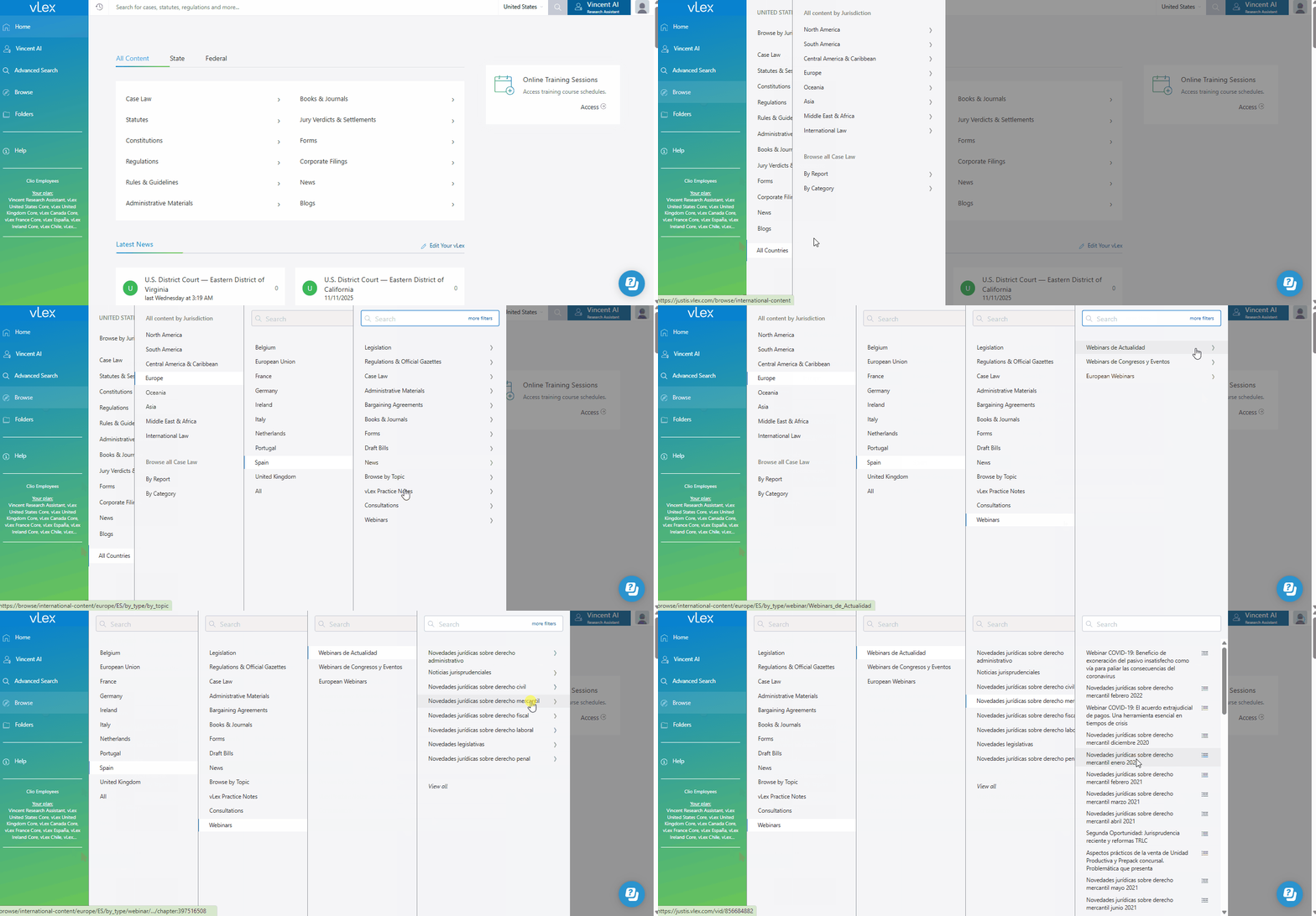
The primary way to find webinars is by using the **Browse** tool.
1. Select **Browse** from the main menu on the left.
2. Look for a **Webinars** collection within your jurisdiction.
3. You can browse the list of available webinars or use the filters on the left to find a session on a specific topic.
{% tabs %}
{% tab title="English Interface" %}
Use the Browse tool to find our collection of informative webinars.
{% endtab %}
{% tab title="Interfaz en Español" %}
Usa la herramienta Examinar para encontrar nuestra colección de seminarios web informativos.
{% endtab %}
{% endtabs %}
{% hint style="info" %}
**Availability Varies by Jurisdiction** The collection of available webinars may vary depending on your country and subscription. For the most up-to-date schedule of live and recorded webinars for your region, please check our corporate website or contact your account manager.
{% endhint %}
### Best Practices & Pro Tips
* **Look for Related Content:** Many webinars include links to related articles, cases, and other materials, allowing you to immediately start your research on the topic discussed.
### Related Articles
* [How to Access Support and Training Resources](/vlex-library/vlex-library-home/support-and-training/how-to-access-support-and-training-resources.md)
* [How to Browse the Law in vLex Library](/vlex-library/vlex-library-home/getting-started/how-to-browse-in-vlex-library.md)
* [Understanding vLex TV (Spain)](/vlex-library/vlex-library-home/jurisdiction-specific-guides/understanding-vlex-tv-spain.md)
**What's Your Next Step?**
| **New to** vLex Library **?** | **Already a** vLex Library **Customer?** |
| --------------------------------------------------------------------------------------------------------------------------------------------------------------------------------------------------------------- | ---------------------------------------------------------------------------------------------------------------------------------------------------------- |
| [See how vLex Library can transform your practice. **Request a personalized demo**.](https://vlex.com/book-a-demo?utm_source=website\&utm_medium=organic\&utm_campaign=web_trial_homepage\&campaign_id=4270741) | [If you still have questions or need help with a specific feature, our team is here to assist. **Contact our Support team**.](https://vlex.com/contact-us) |