# How to Use the vLex Chrome Extension

### Summary

Integrate vLex Library's research power directly into your browser with the **vLex Chrome Extension**. This tool finds legal citations on any webpage, enhances your Google searches with vLex results, and gives you access to Vincent's AI analysis anywhere you browse.

### Why This is Important

The Chrome extension streamlines your **legal research workflow** by bringing vLex's intelligence to you. It saves time by eliminating the need to switch between tabs, allowing you to instantly analyze citations and discover related authorities on any website.

### How to Use the vLex Chrome Extension

#### 1. Install the Extension

1. Go to the [Google Chrome Web Store](https://chromewebstore.google.com/detail/vlex/gjdimoodoalmblikhoicpcfnhlkkghgf?hl=es) and search for "vLex".
2. Click **Add to Chrome**, then confirm by clicking **Add extension** in the pop-up.
3. Pin the vLex icon to your browser's toolbar for easy access.

{% tabs %}
{% tab title="English Interface" %}

<figure><img src="https://1556743161-files.gitbook.io/~/files/v0/b/gitbook-x-prod.appspot.com/o/spaces%2F-MS8Dq_iqEIflAmbaOkI-887967055%2Fuploads%2FatwOTzQK147HzOuawuHx%2FInstall%20the%20vLex%20Chrome%20extension%20in%20just%20a%20few%20clicks%20and%20pin%20it%20for%20instant%20access%20from%20your%20browser..gif?alt=media&#x26;token=a97bcdb6-04cb-412d-a0f0-a56af0ad02a6" alt=""><figcaption><p>Install the vLex Chrome extension in just a few clicks and pin it for instant access from your browser.</p></figcaption></figure>
{% endtab %}

{% tab title="Interfaz en Español" %}

<figure><img src="https://1556743161-files.gitbook.io/~/files/v0/b/gitbook-x-prod.appspot.com/o/spaces%2F-MS8Dq_iqEIflAmbaOkI-887967055%2Fuploads%2Fl3681ucQizCsKD4xpk24%2FInstala%20la%20extensio%CC%81n%20de%20vLex%20para%20Chrome%20en%20solo%20unos%20clics%20y%20fi%CC%81jala%20para%20acceso%20instanta%CC%81neo%20desde%20tu%20navegador..gif?alt=media&#x26;token=da8d6348-c7aa-4f16-84ff-7dcbc5c204aa" alt=""><figcaption><p>Instala la extensión de vLex para Chrome en solo unos clics y fíjala para acceso instantáneo desde tu navegador.</p></figcaption></figure>
{% endtab %}
{% endtabs %}

#### 2. Find and Analyze Citations on Any Webpage

1. When on a webpage with legal references, click the **vLex icon** in your toolbar.
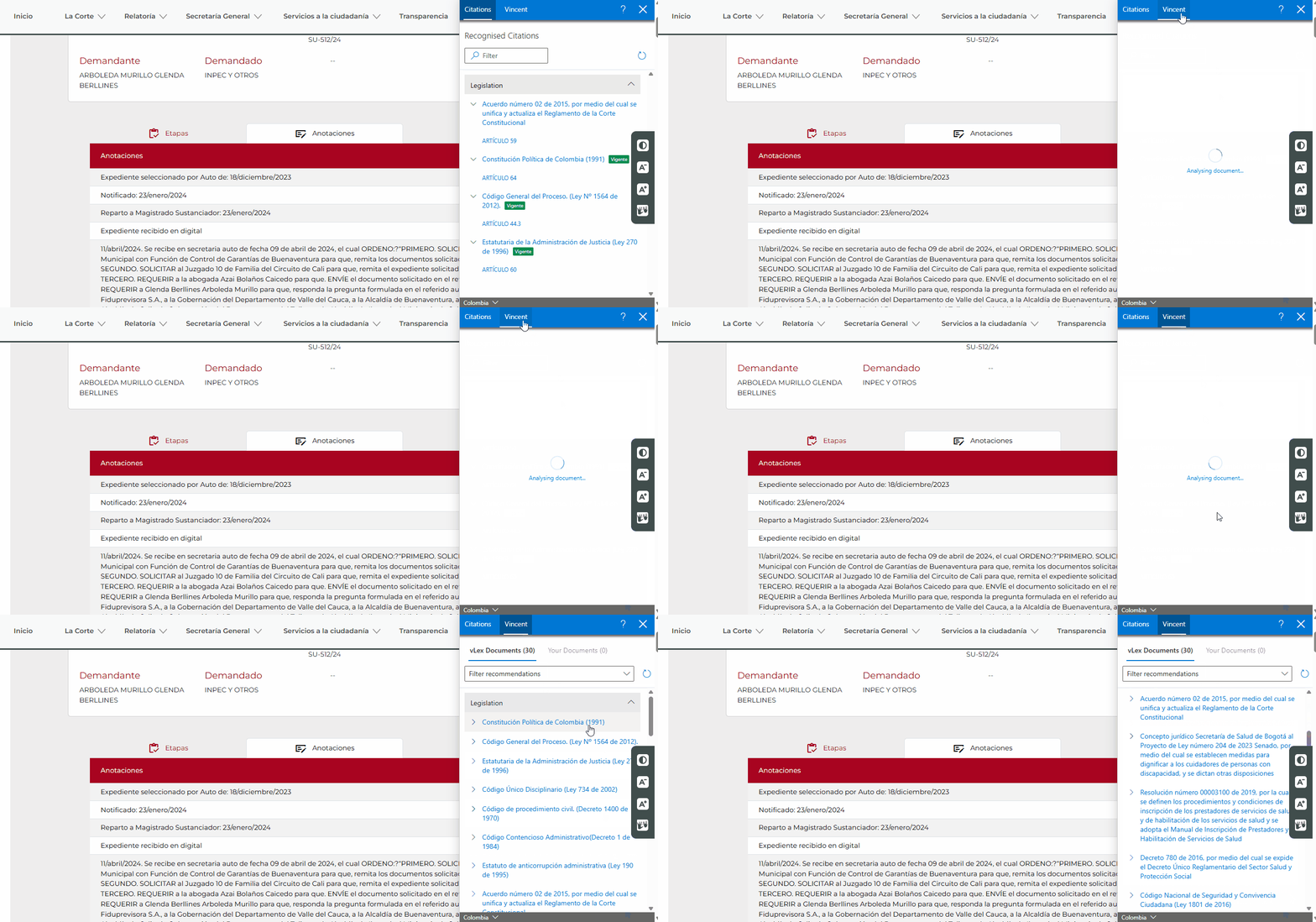
2. The extension will scan the page and display all found citations in a panel on the right.
3. Review the list to see case names, parallel citations, and negative treatment alerts (red flags) for any overruled or distinguished cases.
4. Click any citation to open the full document directly in vLex Library.

{% tabs %}
{% tab title="English Interface" %}

<figure><img src="https://1556743161-files.gitbook.io/~/files/v0/b/gitbook-x-prod.appspot.com/o/spaces%2F-MS8Dq_iqEIflAmbaOkI-887967055%2Fuploads%2F4GpP67ZeE4Gaot7ssI21%2FThe%20extension%20automatically%20finds%20and%20analyzes%20all%20legal%20citations%20on%20a%20webpage.gif?alt=media&#x26;token=95798ed5-3dd5-423b-8b1c-8f34724bc14f" alt=""><figcaption><p>The extension automatically finds and analyzes all legal citations on a webpage.</p></figcaption></figure>
{% endtab %}

{% tab title="Interfaz en Español" %}

<figure><img src="https://1556743161-files.gitbook.io/~/files/v0/b/gitbook-x-prod.appspot.com/o/spaces%2F-MS8Dq_iqEIflAmbaOkI-887967055%2Fuploads%2F4GpP67ZeE4Gaot7ssI21%2FThe%20extension%20automatically%20finds%20and%20analyzes%20all%20legal%20citations%20on%20a%20webpage.gif?alt=media&#x26;token=95798ed5-3dd5-423b-8b1c-8f34724bc14f" alt=""><figcaption><p>La extensión encuentra y analiza automáticamente todas las citas legales en una página web.</p></figcaption></figure>
{% endtab %}
{% endtabs %}

#### 3. Use Vincent for Deeper Analysis

1. In the extension panel, switch to the **Vincent** tab.
2. Vincent will cross-reference the citations from the page and recommend similar, relevant documents from the vLex Library database.
3. Use the **Filter recommendations** menu to narrow Vincent's suggestions by content type or jurisdiction.

{% tabs %}
{% tab title="English Interface" %}

<figure><img src="https://1556743161-files.gitbook.io/~/files/v0/b/gitbook-x-prod.appspot.com/o/spaces%2F-MS8Dq_iqEIflAmbaOkI-887967055%2Fuploads%2Faoaz3m02KmcA2Ol1tXer%2FGo%20beyond%20the%20page%20with%20Vincent%2C%20cross-reference%20citations%20and%20discover%20related%20documents%20tailored%20to%20your%20needs..gif?alt=media&#x26;token=4add6ce7-6c68-40b5-923c-b6dcb8d88d74" alt=""><figcaption><p>Go beyond the page with Vincent, cross-reference citations and discover related documents tailored to your needs.</p></figcaption></figure>
{% endtab %}

{% tab title="Interfaz en Español" %}

<figure><img src="https://1556743161-files.gitbook.io/~/files/v0/b/gitbook-x-prod.appspot.com/o/spaces%2F-MS8Dq_iqEIflAmbaOkI-887967055%2Fuploads%2Faoaz3m02KmcA2Ol1tXer%2FGo%20beyond%20the%20page%20with%20Vincent%2C%20cross-reference%20citations%20and%20discover%20related%20documents%20tailored%20to%20your%20needs..gif?alt=media&#x26;token=4add6ce7-6c68-40b5-923c-b6dcb8d88d74" alt=""><figcaption><p>La extensión encuentra y analiza automáticamente todas las citas legales en una página web.</p></figcaption></figure>
{% endtab %}
{% endtabs %}

{% hint style="warning" %}
**Website Compatibility:** While the extension works on most websites, some sites may prevent it from adding links or finding citations. If links do not appear automatically, you can try clicking the vLex icon to manually trigger a scan.
{% endhint %}

### Best Practices & Pro Tips

* **Enhance Google Searches:** The extension automatically adds a box with relevant vLex results at the top of your standard Google search results for legal queries.
* **Quick Search Shortcut:** In your browser's address bar, type `v` then press `Space` or `Tab`. You can then type a search query to search vLex directly.

### Relevant Video Content

{% embed url="<https://vimeo.com/917899820?share=copy>" %}

### Related Articles

* [How to Translate Legal Documents in vLex Library](https://support.vlex.com/vlex-library/vlex-library-home/workflows-and-productivity-tools/how-to-translate-legal-documents-in-vlex-library)
* [What is Vincent?](https://support.vlex.com/vincent-by-vlex/vincent/getting-started-with-vincent/understanding-what-vincent-is)

**What's Your Next Step?**

| **New to** vLex Library **?**                                                                                                                                                                                   | **Already a** vLex Library **Customer?**                                                                                                                   |
| --------------------------------------------------------------------------------------------------------------------------------------------------------------------------------------------------------------- | ---------------------------------------------------------------------------------------------------------------------------------------------------------- |
| [See how vLex Library can transform your practice. **Request a personalized demo**.](https://vlex.com/book-a-demo?utm_source=website\&utm_medium=organic\&utm_campaign=web_trial_homepage\&campaign_id=4270741) | [If you still have questions or need help with a specific feature, our team is here to assist. **Contact our Support team**.](https://vlex.com/contact-us) |