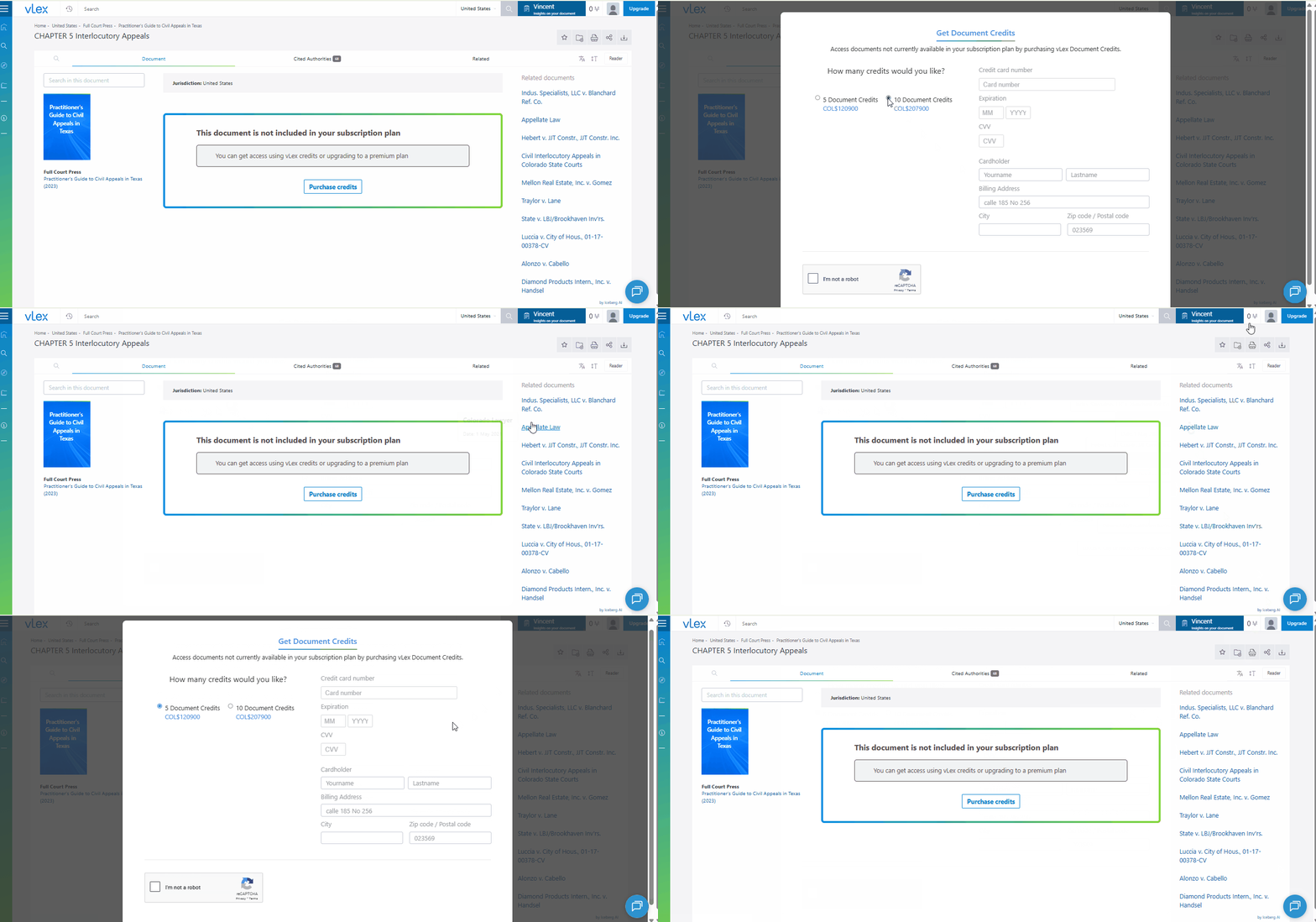
> For the complete documentation index, see [llms.txt](https://support.vlex.com/llms.txt). Markdown versions of documentation pages are available by appending `.md` to page URLs; this page is available as [Markdown](https://support.vlex.com/vlex-library/vlex-library-home/workflows-and-productivity-tools/understanding-and-using-vlex-credits.md).
# Understanding and Using vLex Credits
Learn how vLex Credits let you access documents outside your plan. Purchase individual documents on a pay-as-you-go basis for flexible legal research.
### Summary
**vLex Credits** allow you to purchase access to individual documents or features that are not included in your current subscription plan. This provides a flexible, pay-as-you-go option for accessing content on a one-off basis.
### Why This is Important
vLex Credits give you the flexibility to access the full depth of our **international legal database** when you need it, without having to upgrade your entire subscription for a single document. It ensures you can always get the information you need for your case.
### How to Use vLex Credits
1. When you encounter a document outside your subscription, you will see a prompt to unlock it.
2. Click **View full document** to see the cost in credits.
3. If you have a sufficient balance, you can confirm the purchase to gain permanent access to that document.
4. If you need more credits, click on your **credit balance** at the top of the screen to open a dialog to purchase more.
{% tabs %}
{% tab title="English Interface" %}
Purchase out-of-plan documents on a case-by-case basis using vLex Credits.
{% endtab %}
{% tab title="Interfaz en Español" %}
Compre documentos fuera del plan caso por caso usando créditos vLex.
{% endtab %}
{% endtabs %}
{% hint style="info" %}
**Accessing Your Purchased Documents:** Once you purchase a document with credits, you will always have access to it, even if your subscription changes. You can find all your purchased documents by going to **Folders** from the main menu and selecting **Purchased documents**.
{% endhint %}
### Best Practices & Pro Tips
* **Filter for Subscribed Content:** If you only want to see results that are included in your subscription, use the toggle at the bottom of the filters on the results page to hide out-of-plan content.
### Related Articles
* [Understanding Docket Alarm](/vlex-library/vlex-library-home/affiliated-solutions/understanding-docket-alarm.md)
* [Workflow: How to Create a Research Plan in vLex Library](/vlex-library/vlex-library-home/workflows-and-productivity-tools/workflow-how-to-create-a-research-plan-in-vlex-library.md)
* [Pro Tip: How to Improve Your Search Results](/vlex-library/vlex-library-home/workflows-and-productivity-tools/pro-tip-how-to-improve-your-search-results.md)
**What's Your Next Step?**
| **New to** vLex Library **?** | **Already a** vLex Library **Customer?** |
| --------------------------------------------------------------------------------------------------------------------------------------------------------------------------------------------------------------- | ---------------------------------------------------------------------------------------------------------------------------------------------------------- |
| [See how vLex Library can transform your practice. **Request a personalized demo**.](https://vlex.com/book-a-demo?utm_source=website\&utm_medium=organic\&utm_campaign=web_trial_homepage\&campaign_id=4270741) | [If you still have questions or need help with a specific feature, our team is here to assist. **Contact our Support team**.](https://vlex.com/contact-us) |