> For the complete documentation index, see [llms.txt](https://support.vlex.com/llms.txt). Markdown versions of documentation pages are available by appending `.md` to page URLs; this page is available as [Markdown](https://support.vlex.com/vlex-library/vlex-library-home/workflows-and-productivity-tools/understanding-vlex-library-integrations.md).
# Understanding vLex Library Integrations
Learn how to integrate vLex Library with your research tools. Export citations directly to reference managers like EndNote and RefWorks in just a few clicks.
### Summary
Connect vLex Library with other essential research tools like **RefWorks** and **EndNote**. These integrations allow you to seamlessly export citation information for academic and professional research management.
### Why This is Important
Integrating with bibliography managers streamlines the academic writing and research process. It ensures your citations are accurate and correctly formatted, saving you time and reducing the risk of errors in your work.
### How to Use Integrations
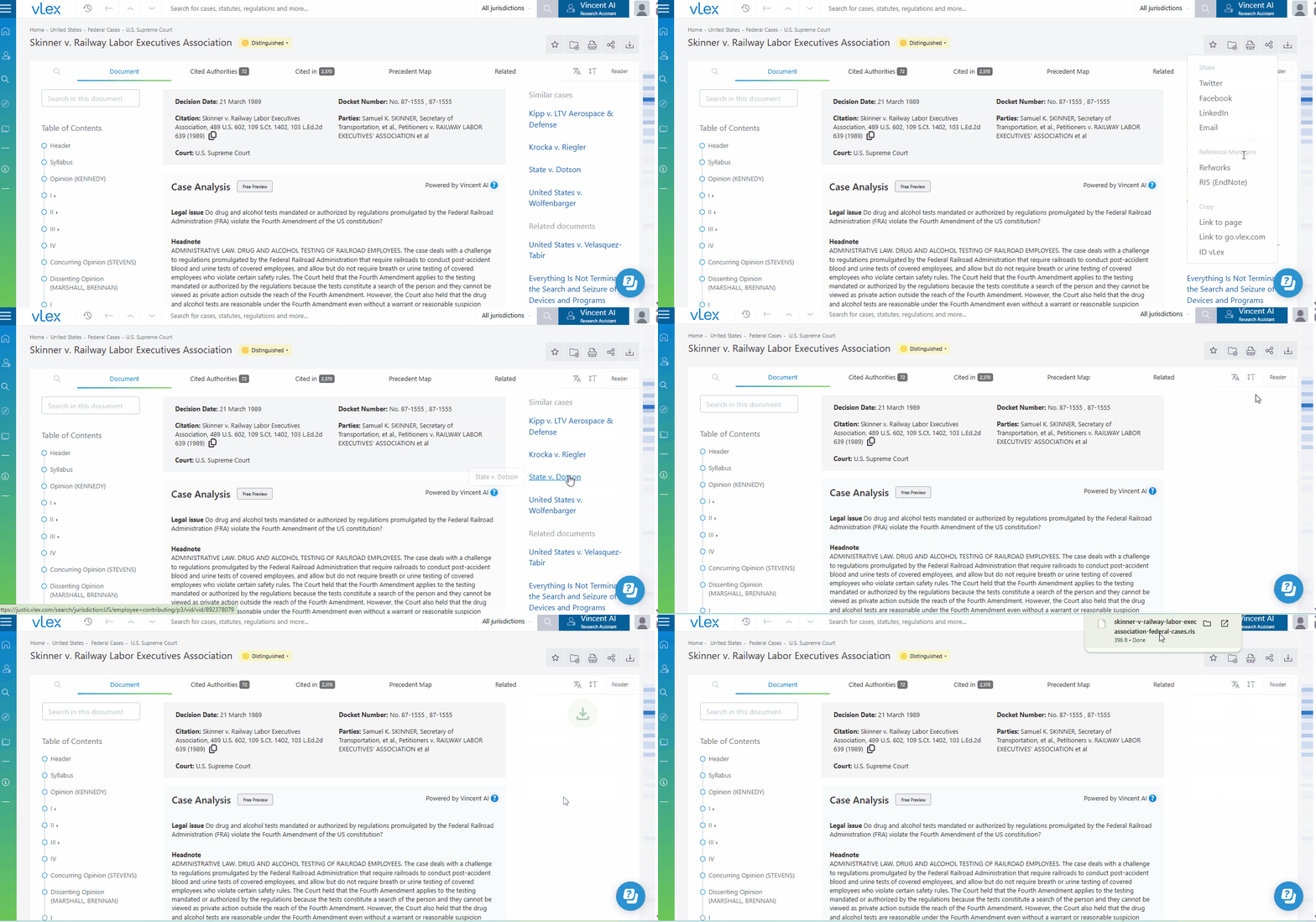
You can export citation data directly from the document viewer.
1. Open the document you wish to cite.
2. Click the **Share** icon in the top-right corner.
3. From the **Reference managers** section of the pop-up menu, select your desired service:
* **RefWorks:** This will open a new tab and take you to the RefWorks site to import the citation.
* **RIS (EndNote):** This will download a `.ris` file to your computer, which you can then import into your EndNote library.
{% tabs %}
{% tab title="English Interface" %}
Export citation data to your preferred reference manager via the Share menu.
{% endtab %}
{% tab title="Interfaz en Español" %}
Comprobar las integraciones de vLex Library
{% endtab %}
{% endtabs %}
{% hint style="info" %}
**Availability:** This feature is typically available for academic, corporate, and government accounts. If you do not see these options, please contact your account manager.
{% endhint %}
### Best Practices & Pro Tips
* **Check Your Format:** After importing, always double-check that the citation matches the specific formatting style required for your work (e.g., Chicago, APA, OSCOLA).
### Related Articles
* [How to Organize Your Research with Folders, Notes, and Highlights](/vlex-library/vlex-library-home/workflows-and-productivity-tools/how-to-organize-your-research-with-folders-notes-and-highlights.md)
* [How to Use the vLex for Word Add-in](/vlex-library/vlex-library-home/workflows-and-productivity-tools/how-to-use-the-vlex-for-word-add-in.md)
* [What is vLex Cloud?](/vlex-library/vlex-library-home/workflows-and-productivity-tools/what-is-vlex-cloud.md)
**What's Your Next Step?**
| **New to** vLex Library **?** | **Already a** vLex Library **Customer?** |
| --------------------------------------------------------------------------------------------------------------------------------------------------------------------------------------------------------------- | ---------------------------------------------------------------------------------------------------------------------------------------------------------- |
| [See how vLex Library can transform your practice. **Request a personalized demo**.](https://vlex.com/book-a-demo?utm_source=website\&utm_medium=organic\&utm_campaign=web_trial_homepage\&campaign_id=4270741) | [If you still have questions or need help with a specific feature, our team is here to assist. **Contact our Support team**.](https://vlex.com/contact-us) |