> For the complete documentation index, see [llms.txt](https://support.vlex.com/llms.txt). Markdown versions of documentation pages are available by appending `.md` to page URLs; this page is available as [Markdown](https://support.vlex.com/vlex-library/vlex-library-home/workflows-and-productivity-tools/workflow-how-to-analyze-a-document-in-vlex-library.md).
# Workflow: How to Analyze a Document in vLex Library
A step-by-step workflow for analyzing documents in vLex Library. Use Vincent's AI summary, verify authority, and find related materials for your case.
### Summary
Follow this workflow to efficiently analyze any document in vLex Library. This process helps you quickly understand a document's key points, verify its authority, and find related materials to strengthen your research.
### Why This is Important
A systematic analysis workflow saves time and ensures you don't miss critical information. This approach, powered by **Vincent**, turns a flat document into a dynamic starting point for deeper **legal research and analysis**.
### A Step-by-Step Analysis Workflow
#### Step 1: Get an Instant Summary (Case Law)
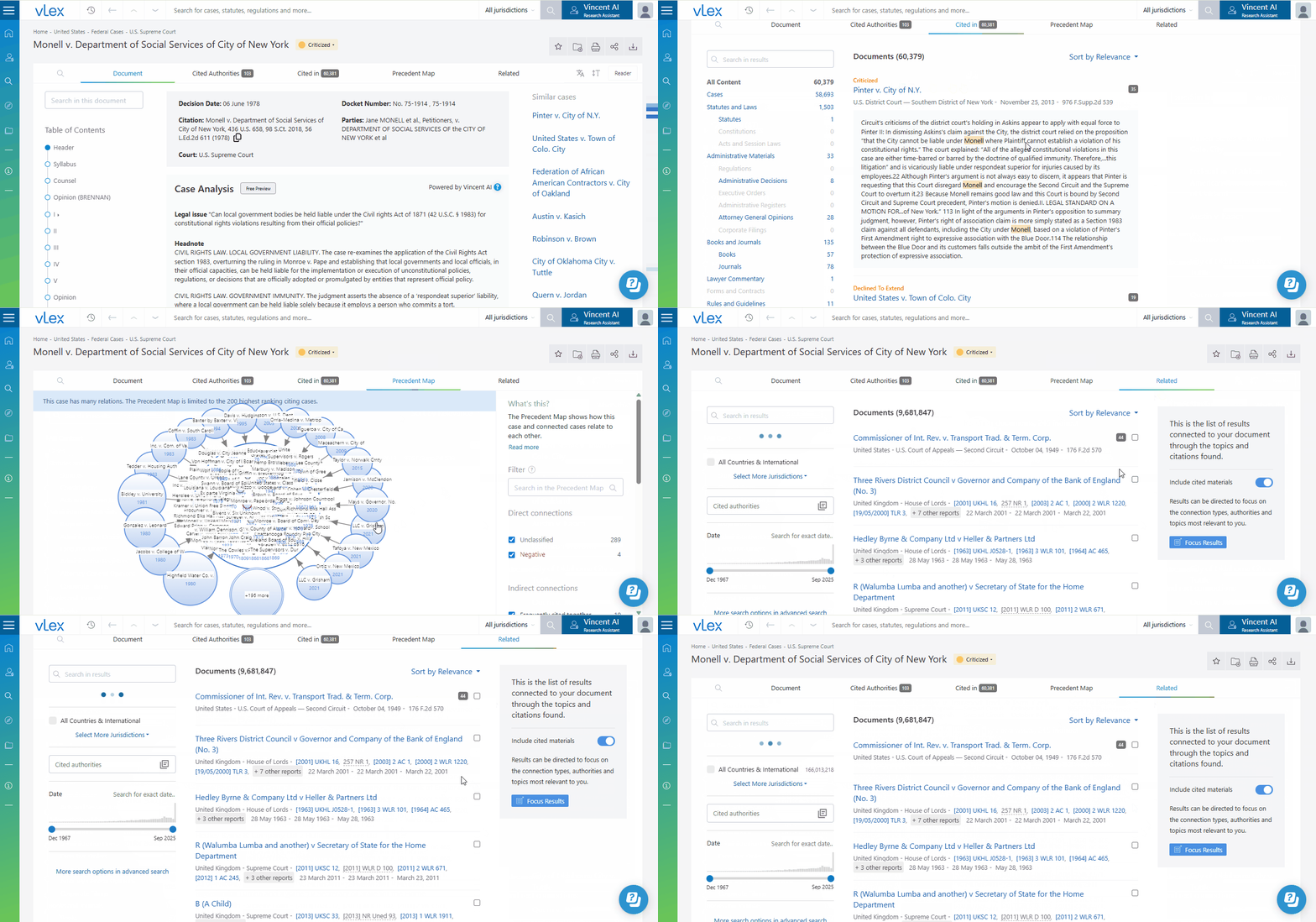
When you open a case, first read the **Vincent Case Analysis** summary at the top. This AI-powered headnote gives you the key legal issues at a glance, helping you decide if the case is relevant to your matter.
#### Step 2: Review the Information Cards
Next, look at the **Document Information Cards** on the right. Pay special attention to:
* **Key phrases:** To understand the main topics.
* **Key paragraphs:** To identify the most-cited (and likely most important) passages of the judgment.
#### Step 3: Verify the Authority
This is the most critical step. Use the main tabs above the document title:
1. Go to the **Cited in** tab.
2. Look for any **Negative Treatment** indicators (red flags) at the top of the list. This immediately tells you if the case is still good law.
3. Use the **Precedent Map** to visualize the case's entire citation network.
#### Step 4: Find Related Documents
Finally, go to the **Related** tab. Here, Vincent will suggest other relevant documents from the vLex database based on shared citation patterns and topics, helping you find persuasive authority you might have otherwise missed.
{% tabs %}
{% tab title="English Interface" %}
Follow this four-step process to analyze any document efficiently.
{% endtab %}
{% tab title="Interfaz en Español" %}
Sigue este proceso de cuatro pasos para analizar cualquier documento de manera eficiente.
{% endtab %}
{% endtabs %}
{% hint style="info" %}
**Analyze Your Own Documents** This same workflow can be applied to your own documents. After uploading a brief or memo via [vLex Cloud](https://www.notion.so/fastcase/link-to-vlex-cloud-article), open it and use the **Related** tab to have Vincent find relevant published authorities.
{% endhint %}
### Best Practices & Pro Tips
* **Use the "Heat Map":** As you read a judgment, notice the blue highlights. The darker the shade, the more frequently that passage has been cited, drawing your eye to the most important text.
### Related Articles
* [How to Analyze Case Authority and Precedent](/vlex-library/vlex-library-home/content-and-document-types/how-to-analyze-case-authority-and-precedent.md)
* [Navigating the Document Viewer in vLex Library](/vlex-library/vlex-library-home/getting-started/navigating-the-document-viewer-in-vlex-library.md)
* [How to Upload and Analyze Your Own Documents](/vlex-library/vlex-library-home/content-and-document-types/how-to-upload-and-analyze-your-own-documents.md)
**What's Your Next Step?**
| **New to** vLex Library **?** | **Already a** vLex Library **Customer?** |
| --------------------------------------------------------------------------------------------------------------------------------------------------------------------------------------------------------------- | ---------------------------------------------------------------------------------------------------------------------------------------------------------- |
| [See how vLex Library can transform your practice. **Request a personalized demo**.](https://vlex.com/book-a-demo?utm_source=website\&utm_medium=organic\&utm_campaign=web_trial_homepage\&campaign_id=4270741) | [If you still have questions or need help with a specific feature, our team is here to assist. **Contact our Support team**.](https://vlex.com/contact-us) |