# How to Reuse Existing Tasks from the Task Library

### Summary

To save time building **custom legal workflows**, you can reuse tasks that you or your colleagues have already created. In Step 3 of the **workflow builder**, simply choose **Add from Library** to search for and add an existing task to your project.

### Why This is Important

The **Task Library** is a shared repository for your entire organization, designed to help you scale your best practices. By reusing pre-built, tested tasks, you not only save significant time and effort but also ensure a high level of consistency and quality across all your firm's automations. This "build once, use many times" approach is a core principle of the **Vincent Studio workflow builder**.

{% hint style="info" %}
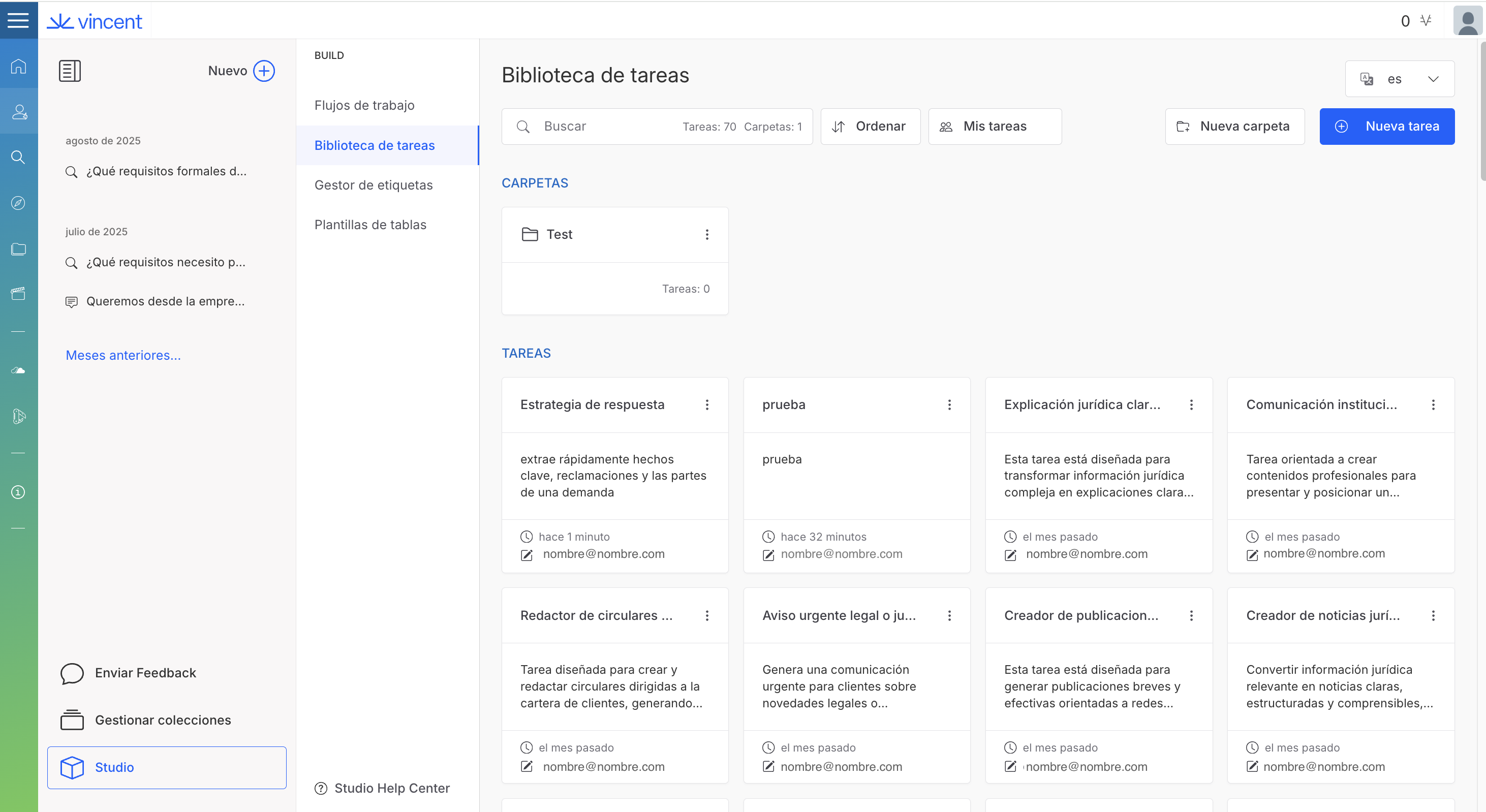
**Everything is Reusable by Default:** Every new task you create is automatically saved to your organization's Task Library. By building a new task, you are also contributing a new reusable asset for your entire team.&#x20;
{% endhint %}

{% tabs %}
{% tab title="English Interface " %}

<figure><img src="/files/M4cKTstcZ0wX16g3554H" alt=""><figcaption><p>Every task you create becomes a reusable asset for your whole team.</p></figcaption></figure>
{% endtab %}

{% tab title="Interfaz en Español " %}

<figure><img src="/files/A7e7cQW80OVVykaGv8y1" alt=""><figcaption><p>Cada tarea que creas se convierte en un recurso reutilizable para todo tu equipo.</p></figcaption></figure>
{% endtab %}
{% endtabs %}

### How to Add a Task from the Library

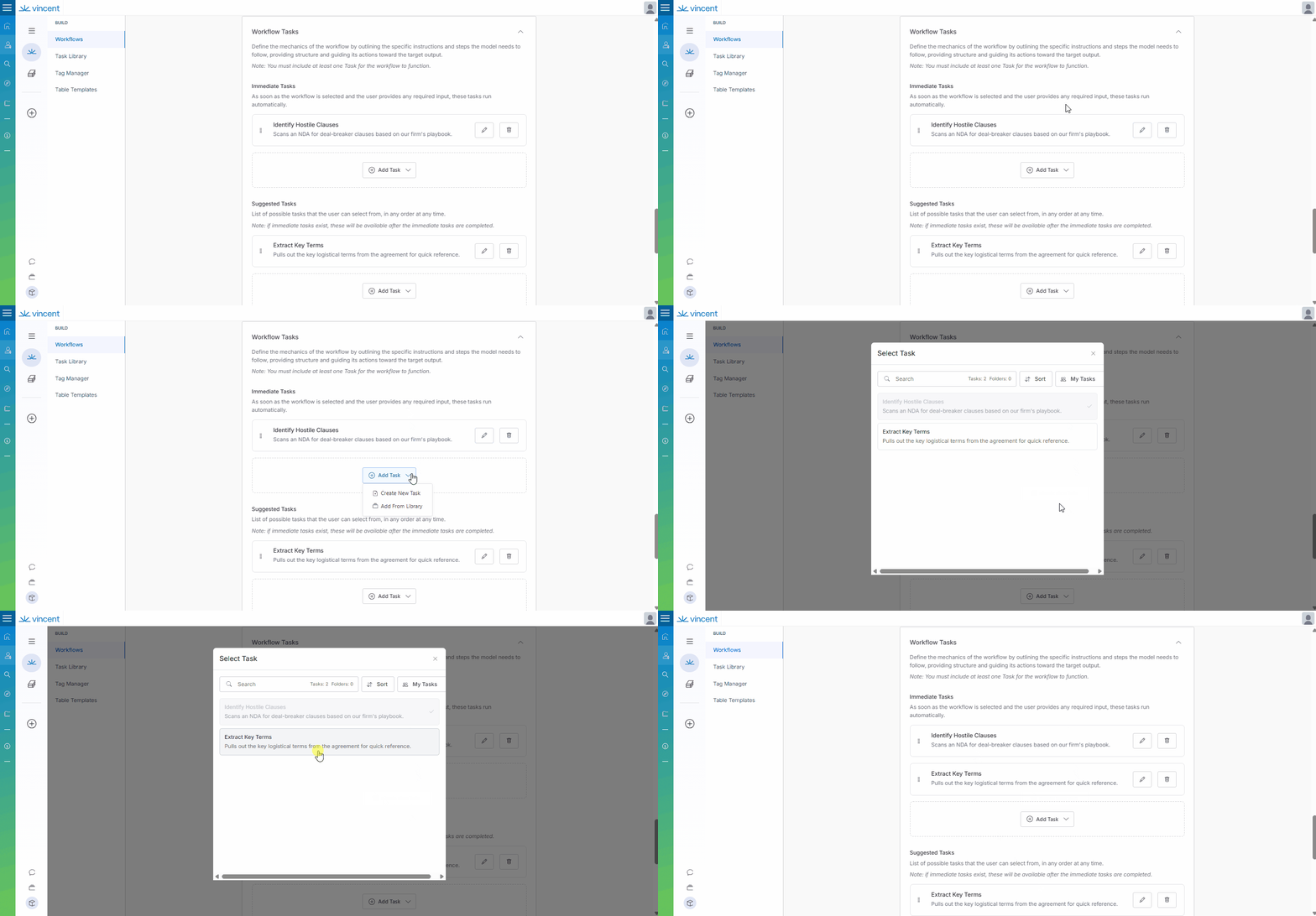
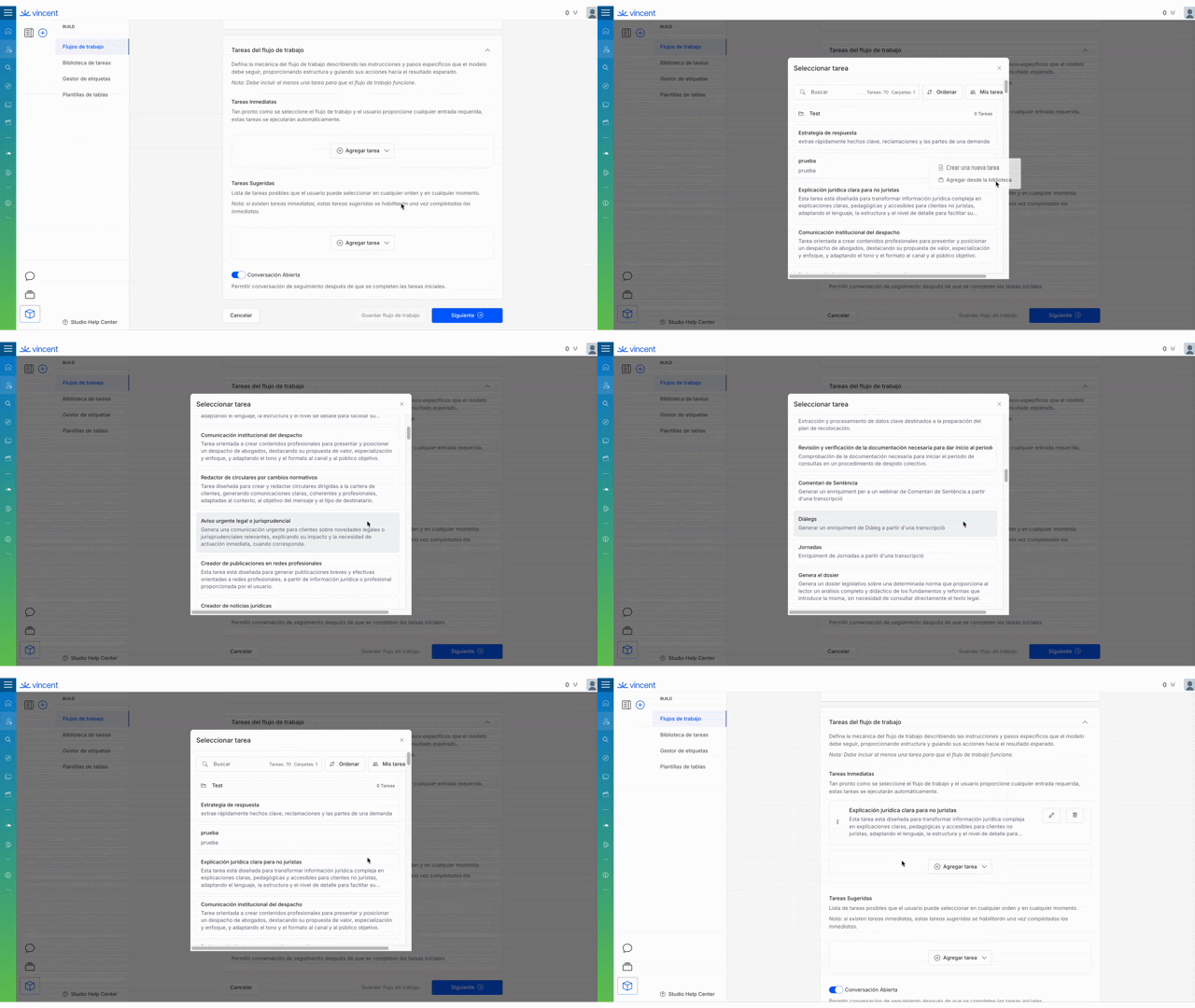
You can add a task from the library in Step 3 of the workflow creation process (`Configure Tasks`).

1. Decide if you want to add the task to the **Immediate Tasks** or **Suggested Tasks** section.
2. Click the **+ Add Task** button in the relevant section.
3. From the dropdown menu, select **Add from Library**.
4. The Task Library window will appear. You can now **search** by name or **filter** the list to find the task you need. The task's name and description will help you identify the right one.
5. Select the desired task from the list and click the **Add Task** button.
6. The task will now appear in your workflow, fully configured and ready to use.

{% tabs %}
{% tab title="English Interface " %}

<figure><img src="/files/1PnAh0vN3KMIcqJXg91d" alt=""><figcaption><p>Quickly add predefined tasks from the Library during workflow setup.</p></figcaption></figure>
{% endtab %}

{% tab title="Interfaz en Español " %}

<figure><img src="/files/qGj7EzRhhtVEcrKbHZ42" alt=""><figcaption><p>Añade rápidamente tareas predefinidas desde la Biblioteca durante la configuración del flujo de trabajo.</p></figcaption></figure>
{% endtab %}
{% endtabs %}

### Best Practices & Pro Tips

* **Name for Discovery:** When you create a *new* task, always give it a clear name and a detailed description. Ask yourself: "If a colleague needed this function, what words would they search for?" This makes your contributions to the library much more valuable.
* **Check the Library First:** Before you build a new task from scratch, always take a moment to check the library. It's highly likely that a colleague has already built a similar task that you can use instantly, saving you from reinventing the wheel.

### Related Articles

* [How to Write Powerful and Effective Prompts in Vincent Studio](/vincent-by-vlex-1/vincent-studio/vincent-studio-advanced-techniques-and-best-practices/how-to-write-powerful-and-effective-prompts-in-vincent-studio.md)
* [Workflow Governance: Quality Control and Lifecycle Management](/vincent-by-vlex-1/vincent-studio/vincent-studio-advanced-techniques-and-best-practices/workflow-governance-quality-control-and-lifecycle-management.md)

### Unlock the Power of Legal Automation

Ready to see how Vincent Studio can transform your firm's efficiency?

[**Contact our sales team for a personalized demo today.**](https://vlex.com/book-a-demo?utm_source=website\&utm_medium=organic\&utm_campaign=web_trial_homepage\&campaign_id=4270741)

**What's Your Next Step?**

| **New to Vincent Studio?**                                                                                                                                                                                 | **Already a Vincent Studio Customer?**                                                                                                                     |
| ---------------------------------------------------------------------------------------------------------------------------------------------------------------------------------------------------------- | ---------------------------------------------------------------------------------------------------------------------------------------------------------- |
| [See how Vincent can transform your practice. **Request a personalized demo**.](https://vlex.com/book-a-demo?utm_source=website\&utm_medium=organic\&utm_campaign=web_trial_homepage\&campaign_id=4270741) | [If you still have questions or need help with a specific feature, our team is here to assist. **Contact our Support team**.](https://vlex.com/contact-us) |


---

# Agent Instructions: Querying This Documentation

If you need additional information that is not directly available in this page, you can query the documentation dynamically by asking a question.

Perform an HTTP GET request on the current page URL with the `ask` query parameter:

```
GET https://support.vlex.com/vincent-by-vlex-1/vincent-studio/creating-and-managing-ai-workflows-in-vincent-studio/how-to-reuse-existing-tasks-from-the-task-library.md?ask=<question>
```

The question should be specific, self-contained, and written in natural language.
The response will contain a direct answer to the question and relevant excerpts and sources from the documentation.

Use this mechanism when the answer is not explicitly present in the current page, you need clarification or additional context, or you want to retrieve related documentation sections.